
Overview of the General Settings panel
General Settings is the central configuration hub in Mazoon ERP. It is where you define your company details, currency and tax, create users and grant them permissions, and set up contacts and print templates. This article explains what the panel contains and the recommended order for setting it up the first time; every section has its own article in this category.
Opening the panel
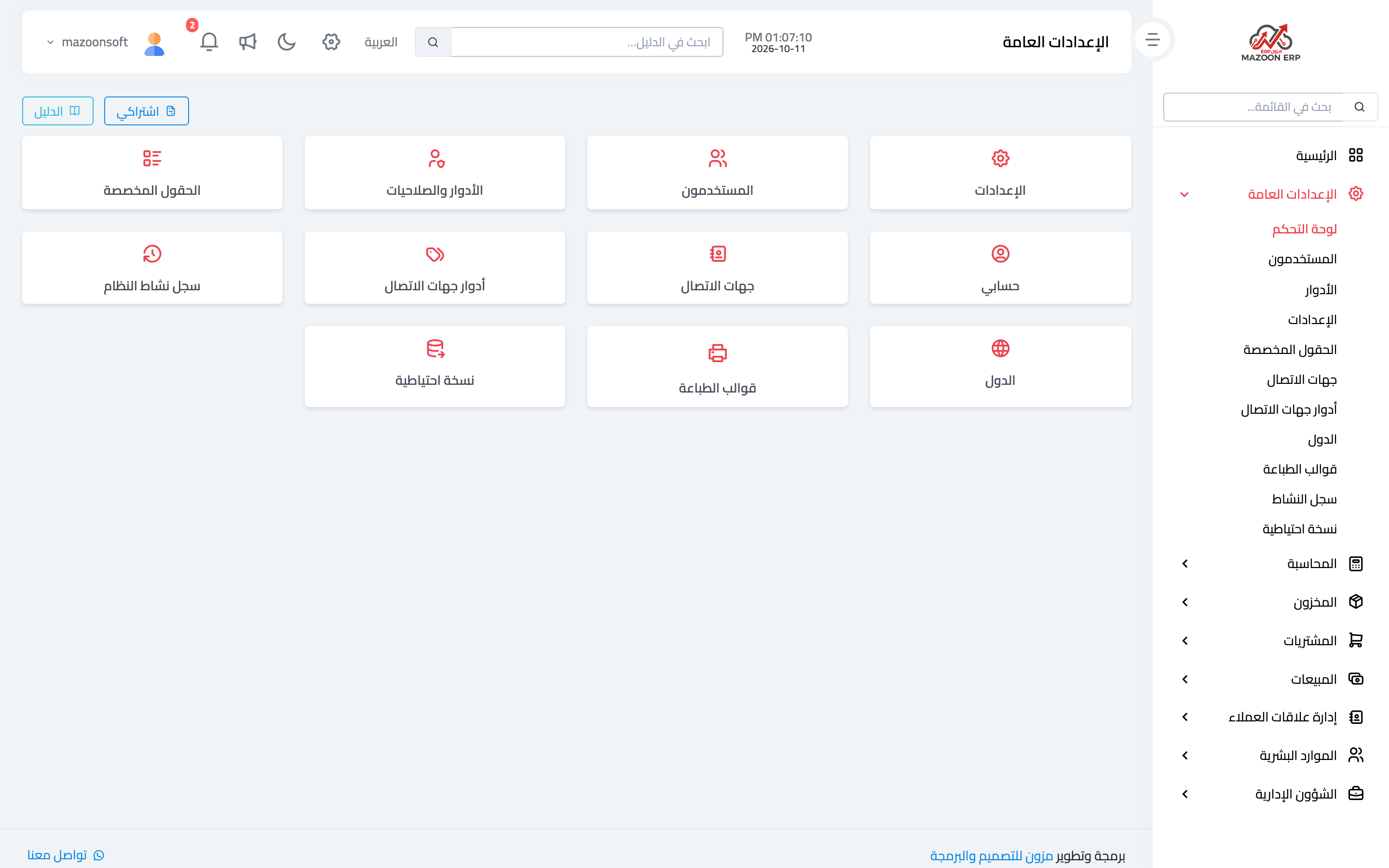
In the sidebar, choose General Settings, then Dashboard. The cards appear as in image 1. Each card opens its own section, and the same sections are listed as direct links under General Settings in the sidebar.
What the panel contains
- Settings — company details and logo, regional settings (country, currency, decimal places, timezone, accounting entries language), tax and e-invoicing.
- Users — create staff accounts, set each account's role and branch, activate or deactivate it.
- Roles & Permissions — define roles and control what each role can see and do in every module.
- Branches — this card appears only when the branches feature is enabled for your business.
- Custom Fields — add your own fields to system forms without any programming.
- My Account — your own details and password; available to every user.
- Contacts — the shared database of customers, suppliers and others, used by Sales, Purchasing and the rest of the modules.
- Contact Roles — how contacts are classified: customer, supplier, and so on.
- System Activity Log — who changed what, and when.
- Countries — the countries used in addresses, and which one is the default.
- Print Templates — the layout used when invoices and receipts are printed.
- Database Backup — download a copy of your business database.
Why the cards differ from one user to another
The panel only shows what your permissions allow. A user without the view-users permission does not see the Users card at all, and a user with none of these permissions sees a notice instead of the cards.
The Branches card also depends on the branches feature being enabled for your business: when it is off, the card is hidden even from users who hold its permission — which is why it is absent from image 1.
Two buttons at the top
- My Subscription — opens your subscription page: plan, period, invoices and receipts.
- Guide — opens the General Settings articles in the in-system guide; the All guide topics button there shows the rest.
Recommended setup order
- Company details and logo.
- Regional settings: currency, decimal places, timezone and accounting entries language.
- Tax and e-invoicing, if your business is subject to them.
- Branches, if your business has more than one.
- Roles, then users — roles first, because every user is attached to a role.
- Contact roles, then contacts.
- Custom fields and print templates.
Set the currency and decimal places before you record any financial transaction: changing them later changes how every previously recorded amount is displayed.
Screenshots
Try what you just read on your own data
Open a free 7-day trial — no credit card, with your own company link in minutes.