
Activity log, database backup and subscription
Three administrative cards in the General Settings panel that you will not use daily, but need the moment you ask: who did this? where is a copy of my data? and how much of my subscription is left?
System activity log
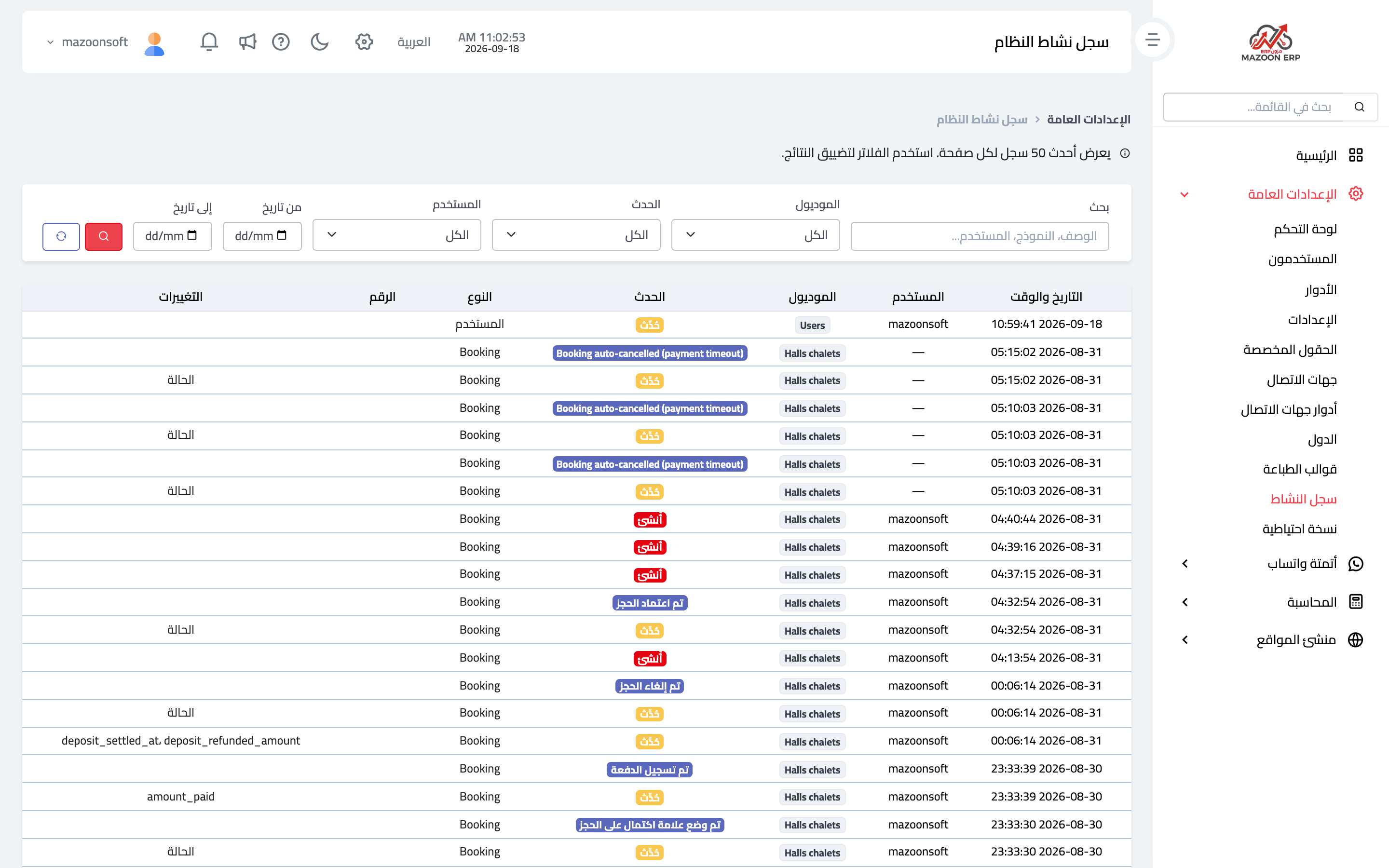
The system records every create, update and delete along with who did it and when. Open the System Activity Log card and the page appears as in image 1, showing the fifty most recent entries per page.
The columns are date and time, user, module, event (created, updated, deleted, or a specific event such as approving a document), the record type and number, and a changes column showing which fields changed in that edit.
Above the table are filters that narrow the results: free-text search, module, event type, user, and a date range. The practical way to use it: start from the date you noticed the problem, filter by module, then read the changes column.
The log is read-only: it cannot be edited and its entries cannot be deleted from within the system. That is exactly its value — an unalterable reference when there is disagreement about what happened.
Database backup
The Database Backup card downloads a full copy of your business database as a .sql file named after the database with the date and time of the download. Click the card and it changes to "Preparing…" until the download starts — which can take a while on large databases.
Important notes:
- The file contains all of your data, so keep it somewhere safe and do not leave it in the downloads folder of a shared computer.
- This copy is in addition to the periodic backups we keep on the servers; take one before any large operation such as a bulk import or a wide edit.
- Access is tied to its own permission, so only those you grant it to can see the card.
My subscription
The My Subscription button at the top of the General Settings panel opens your subscription page: the current plan, its period, the renewal date, and the subscription invoices and receipts, which can be printed.
If no subscription is linked to your account yet — during a trial, for example — the page says so and offers a button to contact us directly on WhatsApp to activate or renew it.
Screenshots
Try what you just read on your own data
Open a free 7-day trial — no credit card, with your own company link in minutes.