
How do I link an event to an accounting account?
Why does creating an invoice produce an accounting entry by itself? Because every event in the system is tied to specific accounts. That linkage comes preconfigured, but you need to adjust it whenever your chart of accounts differs from the default one.
Two different screens
- Event linking — Figure 1 — controls “is an entry created at all?” for each event: invoice, receipt voucher, expense, payroll approval, advance disbursement, and so on.
- Account linking — Figure 2 — controls “which account is debited and which credited?” for each event.
How to change the linkage
- Open Accounting → Account linking and find the event you want.
- Press Edit, then change the debit or credit account to the right one in your own chart.
- Save. The change applies to new documents only; existing entries stay as they were.
When to disable an event
The creates an entry switch is turned off in essentially one case: you already record that event accounting-wise somewhere else and do not want two entries for one transaction. Otherwise leave it on.
Notes
- Do not change the linkage mid-month; you will end up with half the entries on one account and half on another. Defer it to the start of a period.
- If you find an entry on an unexpected account, start from this screen before assuming the document is at fault.
- Disabling an event does not block the document, only its entry; take care not to leave the transaction with no accounting effect.
Screenshots
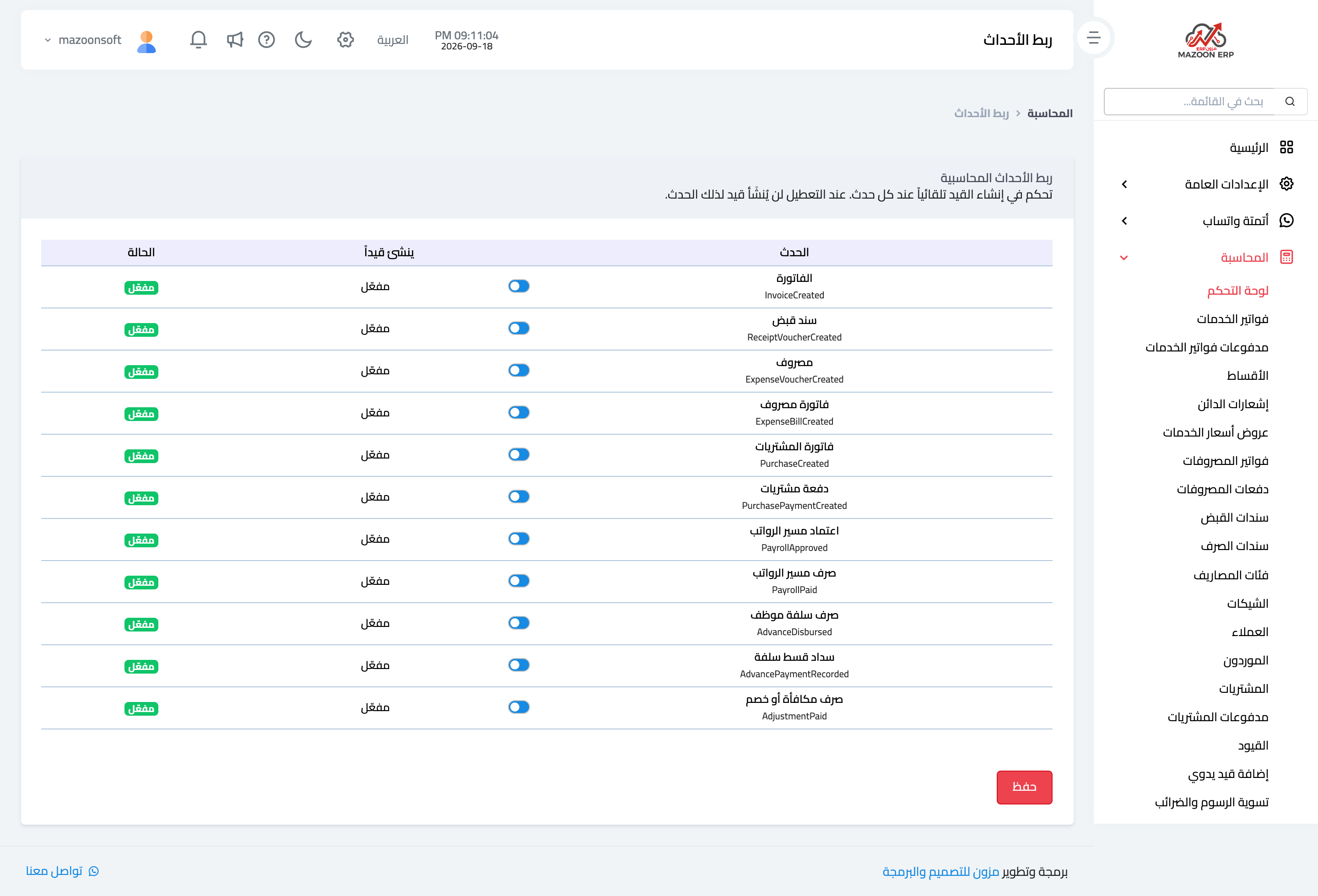
Figure 1

Figure 2
Try what you just read on your own data
Open a free 7-day trial — no credit card, with your own company link in minutes.