
Billing per installment for long contracts
In a contract that has an installment schedule, such as a monthly or yearly one, you may not want the whole contract's revenue and VAT recorded on the day it is activated, but with each installment as it falls due. That is what billing per installment does: each installment's revenue and VAT are recorded on time, and an invoice is issued for it when e-invoicing is on.
Turning it on
- Open Vehicle Rental → Office Settings, General tab, and turn on «Bill contracts with installments per installment» — Image 1.
- Create the contract as usual, and give it an installment schedule before activating it — see «How do I split a long contract into instalments?».
- On activation (the button or the customer's signature) the contract's billing method is fixed as «Per installment»; it shows as a badge in the contracts list, and you can filter the list by it with the Billing method filter.
- The setting applies only to contracts activated after it is turned on that have an installment schedule at activation. Existing contracts stay as they were activated.
- With the setting off, an installment contract records all its revenue on activation as usual, and the installments are only a payment schedule. With e-invoicing on, the settings warn you that the whole contract's VAT is then due on activation.
- It also works without e-invoicing: entries are recorded per installment, without invoices.
When is an installment billed?
- On its due date: its revenue and VAT are recorded and its invoice issued automatically after midnight.
- When paid early: if the installment, or part of it, is paid before its date, it is billed at once, because VAT is due when the money is received.
- On activation: an installment already due (like the first one on the contract's start day) is billed at once. If the first installment falls later, no rent is recorded until it does.
- Installments are billed in order; none is billed before the one before it.
- Add-ons and violations are not split over the installments: add-ons have their own invoice and entry, violations their own entry.
An invoiced installment is not edited
An installment whose revenue was recorded shows the «Invoiced» badge in the installment schedule — Image 2. It cannot be edited or deleted, and the schedule of this contract cannot be rebuilt or deleted. If the installment's amount is wrong:
- Press Correct with a note on its row.
- Type the Correct amount and the Reason (required; it is printed on the note and sent to ZATCA), then save.
- A credit note is issued if the correct amount is lower, or a debit note if it is higher, with an entry for the difference.
- The contract total does not change: the difference moves to the next uninvoiced installments. If no uninvoiced installment is left, the system refuses the correction, and it also refuses an increase larger than the remaining uninvoiced installments.
- To reduce the contract itself use a discount on the contract; the difference is settled at return with a credit note.
- An installment cannot be corrected after the return is recorded, because the final settlement covered the rest.
At return and cancellation
- Return: when the return details are saved, the system compares the contract's actual rent with what was billed on the installments, and issues a debit note (late return or extra kilometres) or a credit note (early return) for the difference. Installments not billed yet are closed, so nothing is billed after the return.
- Cancellation: a credit note for everything billed, and the entries are reversed.
Screenshots

Figure 1
— The «Bill installment contracts per installment» option in office settings
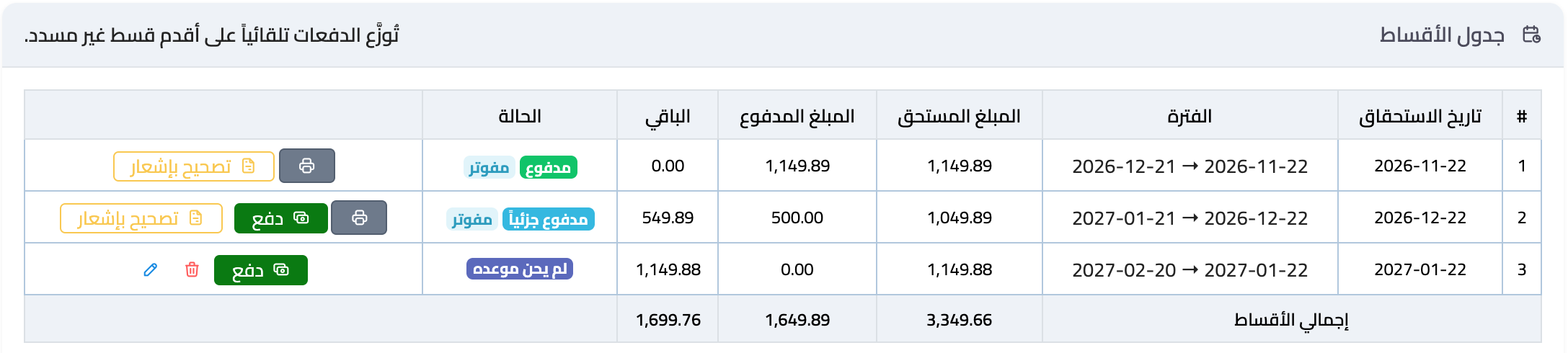
Figure 2
— The installment schedule with the «Invoiced» badge
Try what you just read on your own data
Open a free 7-day trial — no credit card, with your own company link in minutes.