
How do I split a long contract into instalments?
Monthly and yearly contracts are rarely paid in one go. An instalment schedule turns the contract value into instalments with clear due dates, and payments are applied to them automatically, so on any day you know which instalment is paid and which is late.
Creating the schedule
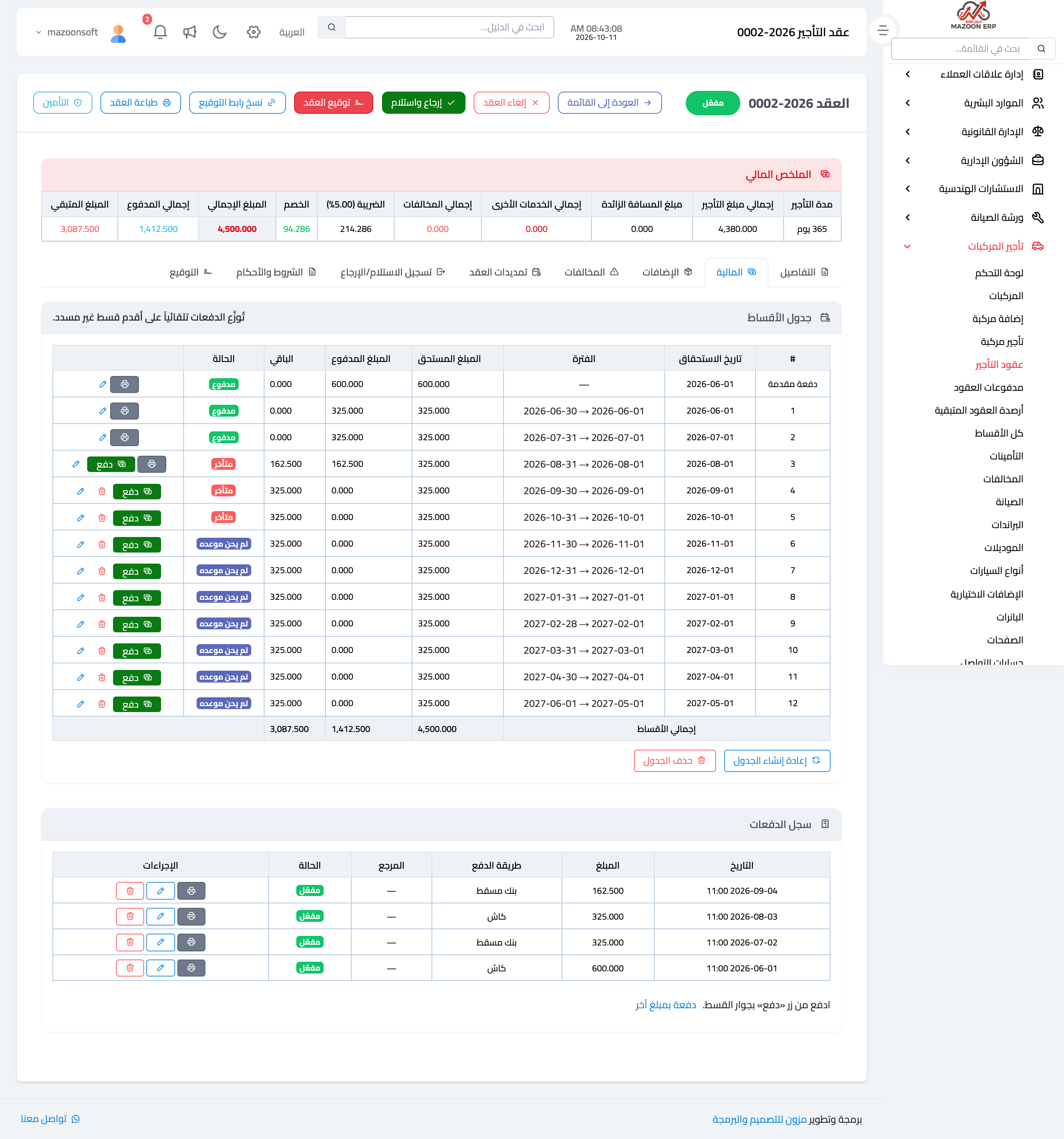
- Open the contract, then the Financial tab; the instalment schedule is at the top of it — Figure 1.
- Press Create installment schedule and choose how to split it: Equal split (every instalment the same amount) or Custom distribution (you set each instalment’s amount and date yourself; see “Custom distribution” below).
- For an equal split, choose the frequency: monthly, bi-weekly, weekly, or a single upfront payment.
- A preview appears before anything is saved: the down payment, the number of instalments, the instalment amount and the dates. Nothing is saved until you press Generate schedule.
How the schedule is built
- Whatever the customer paid before the schedule was created appears in the first row as the Down payment, and with an equal split the balance is divided equally over the periods.
- Each instalment falls due at the start of its period, beginning on the contract start date; no extra instalment is added on the end date.
- The instalments always add up to the contract total: add an add-on, a violation or an extension and the last instalment grows or a new one is added; if the total falls, the last instalments shrink.
Custom distribution
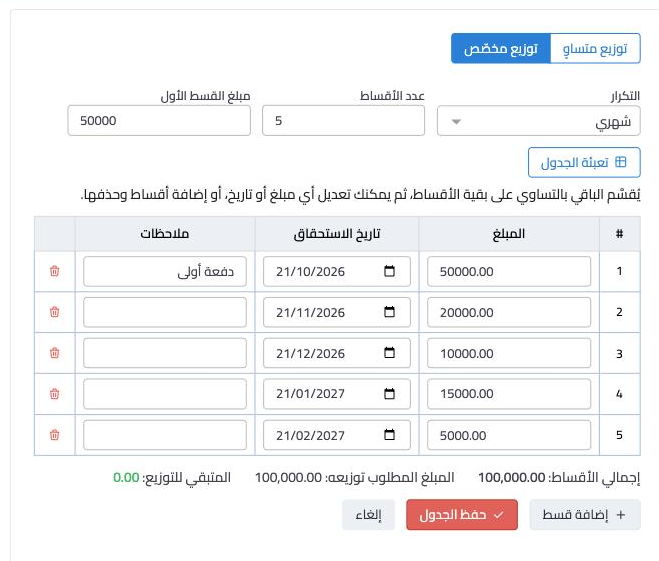
When the instalments are not equal — say a contract of 100,000 with a first instalment of 50,000 and the rest in different amounts — use Custom distribution — Figure 3.
- Press Create installment schedule (or Rebuild schedule if the contract already has one), then choose Custom distribution.
- Enter the First installment amount and the Number of installments, choose the frequency, and press Fill the table. The first instalment gets the amount you entered and the rest is split equally over the other instalments. Leave the number empty to take it from the contract period.
- Change whatever you need: each instalment’s amount, due date and notes. Press Add installment for a new row, or the delete icon to remove one.
- Watch the line under the table: Installments total, Amount to distribute and Left to distribute. Save schedule works only once nothing is left to distribute.
- Press Save schedule. Nothing is saved before that.
- Down payment: whatever the customer paid before any schedule existed is shown above the table and stays as it is; only the balance is distributed.
- Editing after payments: rebuild a custom schedule after the customer has paid some instalments and the editor opens with the current instalments as they are. The amount paid does not turn into a down payment; it is still applied to the oldest instalments first.
- Order: on saving, instalments are sorted by due date, whatever order you typed them in.
- Past dates: you can give an instalment a date that has passed, but it is outlined in red and you are told it will show as overdue unless paid.
Collecting instalments
- Press Pay on an instalment and the payment form opens with its amount. If earlier instalments are still unpaid, the suggested amount includes them.
- Choose the payment method and date and save; a receipt voucher with its journal entry is recorded like any payment on the contract.
- Every payment is applied automatically to the oldest unpaid instalment, and the status changes to paid, partly paid or overdue.
- For an amount that matches no single instalment use the Record a payment of another amount link under the schedule; it is applied by the same rule.
- Print the voucher for a paid instalment from the Print voucher button on its row.
Changing the schedule
- Edit due date changes an instalment’s date and notes only. To change instalment amounts, use Rebuild schedule and then Custom distribution.
- Delete installment is available for an unpaid instalment; its amount is spread equally over the remaining unpaid instalments and the contract total does not change.
- Rebuild schedule either splits the balance after the down payment equally again, or, with a custom distribution, opens the current instalments for you to edit. Either way it re-applies the payments to the new schedule and changes no payment and no journal entry.
- Remove schedule deletes the instalments only; payments are not affected.
Following instalments across all contracts
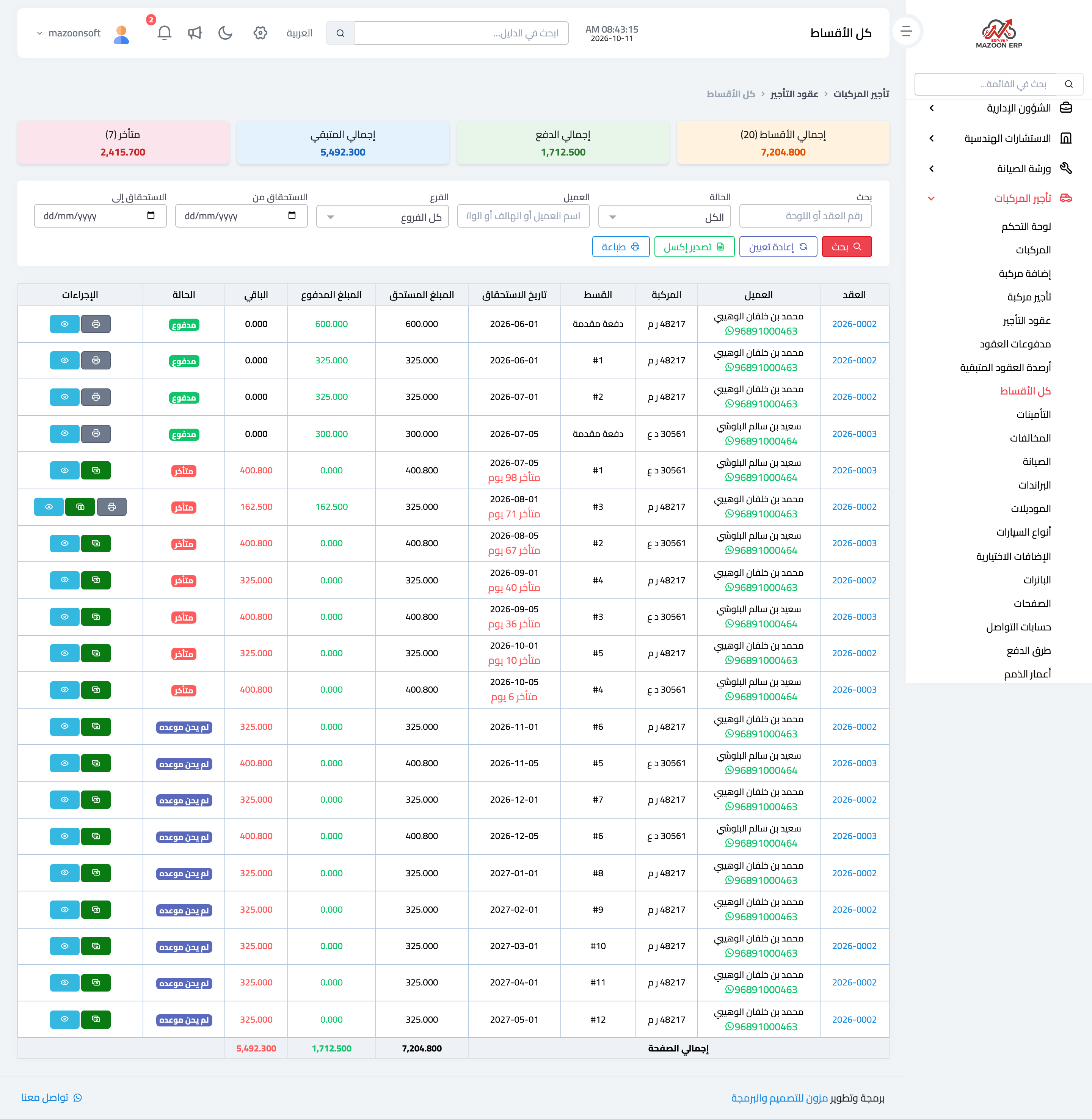
Open Vehicle Rental → All installments — Figure 2 — to see every contract’s instalments in one place: overdue, due within 7 days and unpaid. Search by contract, plate, customer, branch or due date, pay an instalment straight from the list, message the customer on WhatsApp, and export to Excel or print.
Notes
- An instalment becomes overdue on the day after its due date; one that falls due today is not overdue yet.
- Payments are the source and instalments follow them; record each payment once only, from the instalment’s button or from the payment form.
- For short contracts of a day or two a schedule is pointless; just record the payment.
Screenshots
Try what you just read on your own data
Open a free 7-day trial — no credit card, with your own company link in minutes.