
How does e-invoicing (ZATCA) work for rental contracts?
If you turned on e-invoicing (the link with ZATCA, the Zakat, Tax and Customs Authority), the system issues each rental contract's tax documents automatically, so you never create an invoice by hand. The rule is simple: the contract itself is not an invoice, and every revenue or VAT entry recorded for the contract comes with a tax document for the same amount on the same date. If e-invoicing is off, nothing changes.
When is each document issued?
- Contract activation (the Activate contract button or the customer's signature): a tax invoice for the rent and the add-ons on the contract. It is simplified for a customer without a VAT number and standard for a customer with one.
- Add-on added after activation: a debit note for its amount. Deleted: a credit note. Amount changed: a credit note for the old amount and a debit note for the new one. Renaming an add-on alone issues nothing.
- Contract extension: a debit note for the extension amount.
- Return: if the contract total changes when the return details are saved (lateness, extra kilometres or an early return), a debit note for the increase or a credit note for the decrease.
- Cancellation: a credit note for everything invoiced on the contract. If you restore a cancelled contract, a new invoice is issued.
- «Per installment» contract: no invoice for the whole contract at activation, but one invoice per installment on its due date or when paid early (add-ons are invoiced at activation) — see «Billing per installment for long contracts».
Every note refers to the original invoice and gives the reason, and takes the invoice's type (simplified or standard). Every document carries the date it was issued, and its journal entry has the same date. Add-ons entered while the contract is a draft are not posted on the day they are added; they go into the activation invoice.
Traffic violations and the security deposit get no documents from the rental contract.
The «Tax documents» tab
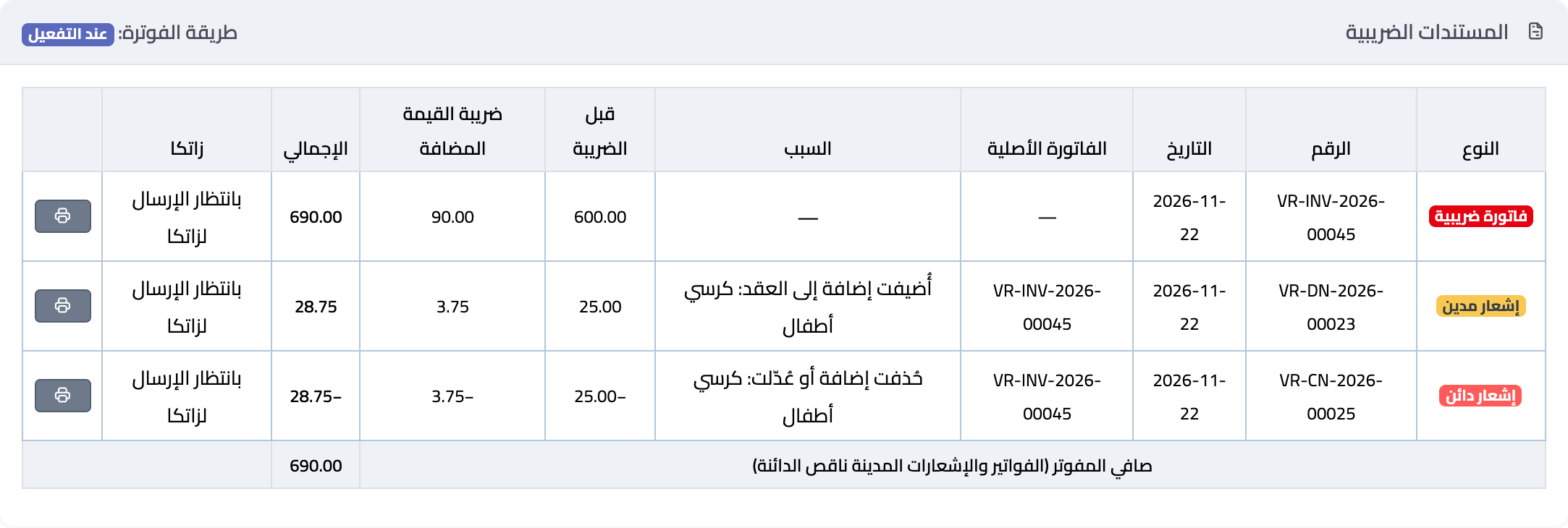
The contract page has a Tax documents tab (Image 1) listing the contract's documents: type, number, date, original invoice, reason, before VAT, VAT, total, ZATCA status, and a print icon that prints the document with its QR code. At the bottom is the Net invoiced (invoices and debit notes minus credit notes), and at the top the Billing method: «At activation» or «Per installment (long-term contract)».
ZATCA statuses:
- Waiting to be sent to ZATCA: issued and sent automatically — a standard document right after it is saved, a simplified one within minutes.
- Reported to ZATCA (simplified) or Cleared by ZATCA (standard): accepted.
- Sending failed (retrying): a connection problem; the system retries by itself.
- Rejected by ZATCA or Withdrawn: needs a fix — see the next section.
- Needs review: the system could not confirm the result; check the sent e-invoices page under General Settings.
- Phase 1 (QR): for accounts on phase 1 of e-invoicing; the document is printed with a QR code and nothing is sent to ZATCA.
A standard invoice (to a company) is not printed before ZATCA clears it. Once a contract has tax documents, the contract print no longer carries a QR code, because each invoice has its own.
If ZATCA rejects a document
- Its status shows in red: Rejected by ZATCA.
- Fix the cause, usually in the customer's data (VAT number or address) or in the business details of the tax settings.
- Press Send again next to the document.
- A rejected document is not counted in totals until it is sent again.
- In a cancelled contract a rejected document is not sent again, because the contract's entries were reversed.
- If the contract invoice is rejected and you record an early return, the system asks you to send the invoice again first, because the credit note must refer to an accepted invoice.
E-invoicing reconciliation
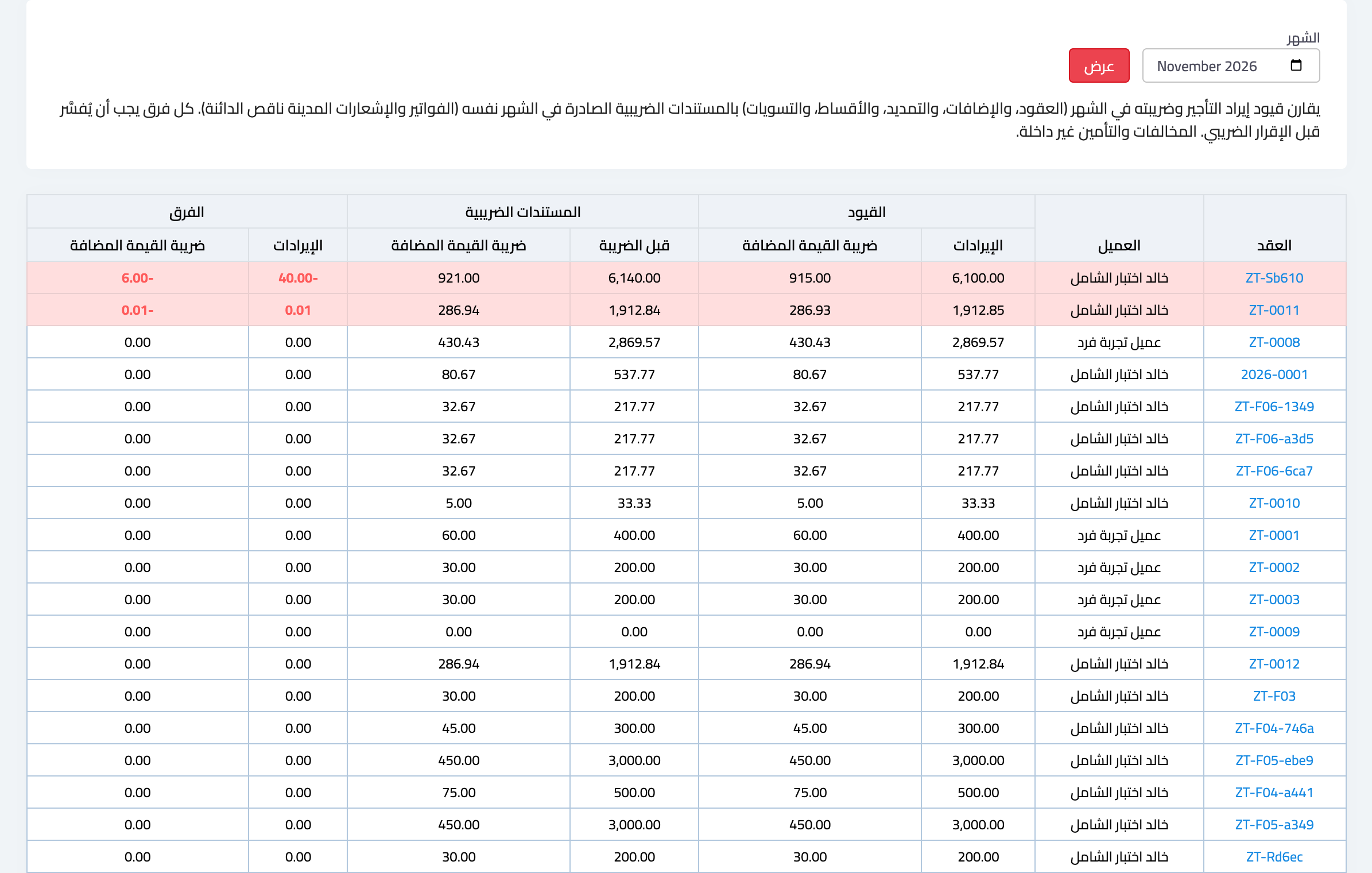
From the Vehicle Rental dashboard open E-invoicing reconciliation (Image 2) and choose the month. For each contract it compares the month's revenue and VAT entries with the documents issued in it. A red row is a difference to explain before filing the VAT return. Violations and the deposit are not included.
Contracts before e-invoicing
Open contracts activated before e-invoicing was turned on have entries without invoices. Find them in Contracts before e-invoicing and press Issue catch-up invoice to issue an invoice, dated today, for what was posted and not invoiced. After that, their notes (extension, return, cancellation) are issued normally. If you record an early return on such a contract before issuing its invoice, the catch-up invoice is issued automatically, then the credit note.
Where are all the invoices?
The Invoices page on the Vehicle Rental dashboard gathers every contract's documents in one place, with search, totals, bulk print and Excel export — see «How do I view, print and export contract invoices?».
Screenshots
Try what you just read on your own data
Open a free 7-day trial — no credit card, with your own company link in minutes.