
How do I record a payment against a sales invoice?
The customer has paid part or all of the amount, and you want that reflected in their account and in your till. The quickest route is the Payments tab inside the invoice itself.
Steps
- Open the invoice and go to the Payments tab — image 1.
- A three-part bar shows at the top: total, paid amount and balance.
- Under add payment, set the date to the day the money actually came in.
- Choose the payment method — cash, bank or cheque.
- Amount and allocation amount come pre-filled with the balance; reduce them for a part payment.
- Reference comes pre-filled with the invoice number; replace it with the transfer or cheque number.
- Add notes and press Save.
The payment appears in the payments table with its receipt number, date, method and reference, along with print, edit and delete buttons.
What a payment does
- A separate receipt is created with its own number and allocated to the invoice.
- A journal entry is posted: cash or bank goes up, the customer's receivable goes down.
- The payment status in the invoices list updates: unpaid, partially paid or paid.
Recording the payment with the invoice
If the customer pays at the moment of sale there is no need for two steps: switch on Record Payment on the invoice create screen, choose the method, the deposit account and the amount, and the receipt is created with the invoice in one go.
Notes
- The payment date is the date money arrived, not the invoice date. The gap between the two is the gap between an accrual report and a cash-collection report.
- A payment larger than the balance is refused.
- No payment can be recorded against a draft or cancelled invoice — approve it first.
- Deleting a payment reverses its entry and returns the invoice to its previous state; that is the escape hatch when you need to edit a paid invoice.
- Payments on POS invoices can never be deleted — which is why a POS invoice cannot be edited.
- To collect one amount covering several invoices, use Sales Receipts instead of recording a payment on each.
Screenshots
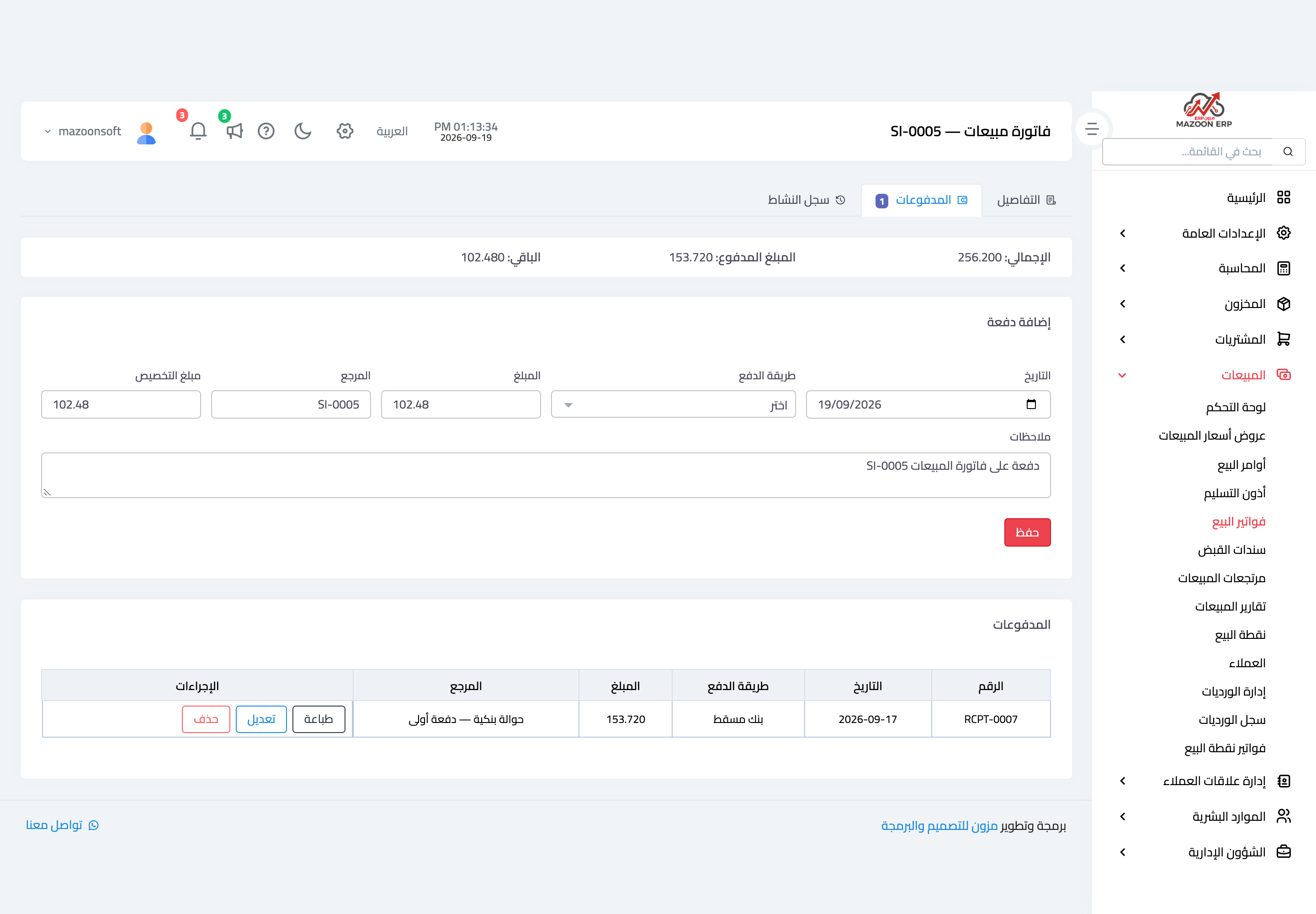
Figure 1
Try what you just read on your own data
Open a free 7-day trial — no credit card, with your own company link in minutes.