
How do I pull up the service history of a specific vehicle?
The service history is what separates an organised workshop from one that starts from zero at every visit. It is also what the customer asks for when they sell the vehicle.
Steps
- Open Workshop → Customer vehicles and search by plate number or customer name.
- Press View on the vehicle — Figure 1.
- You get its job cards and invoices with entry dates and odometer readings, in chronological order.
- To print: press Print history and hand the customer a documented copy.
- To export: press Export history for an Excel file when the customer is a company asking for a statement.
Where this pays off
- A customer saying “the fault was never fixed” — open their history and see when it came in and what was done.
- A customer selling the vehicle — a printed history raises its value and serves your reputation.
- Before a new quotation — the history shows what was recently replaced, so you do not sell a part that is still new.
Notes
- The history is only useful if the vehicle is registered once, not duplicated under differently written plates.
- The technician’s notes on the card are the most valuable thing in the history a year later.
- Recording the odometer at every visit makes the history tell the story of how the vehicle is used, not just list invoices.
Screenshots
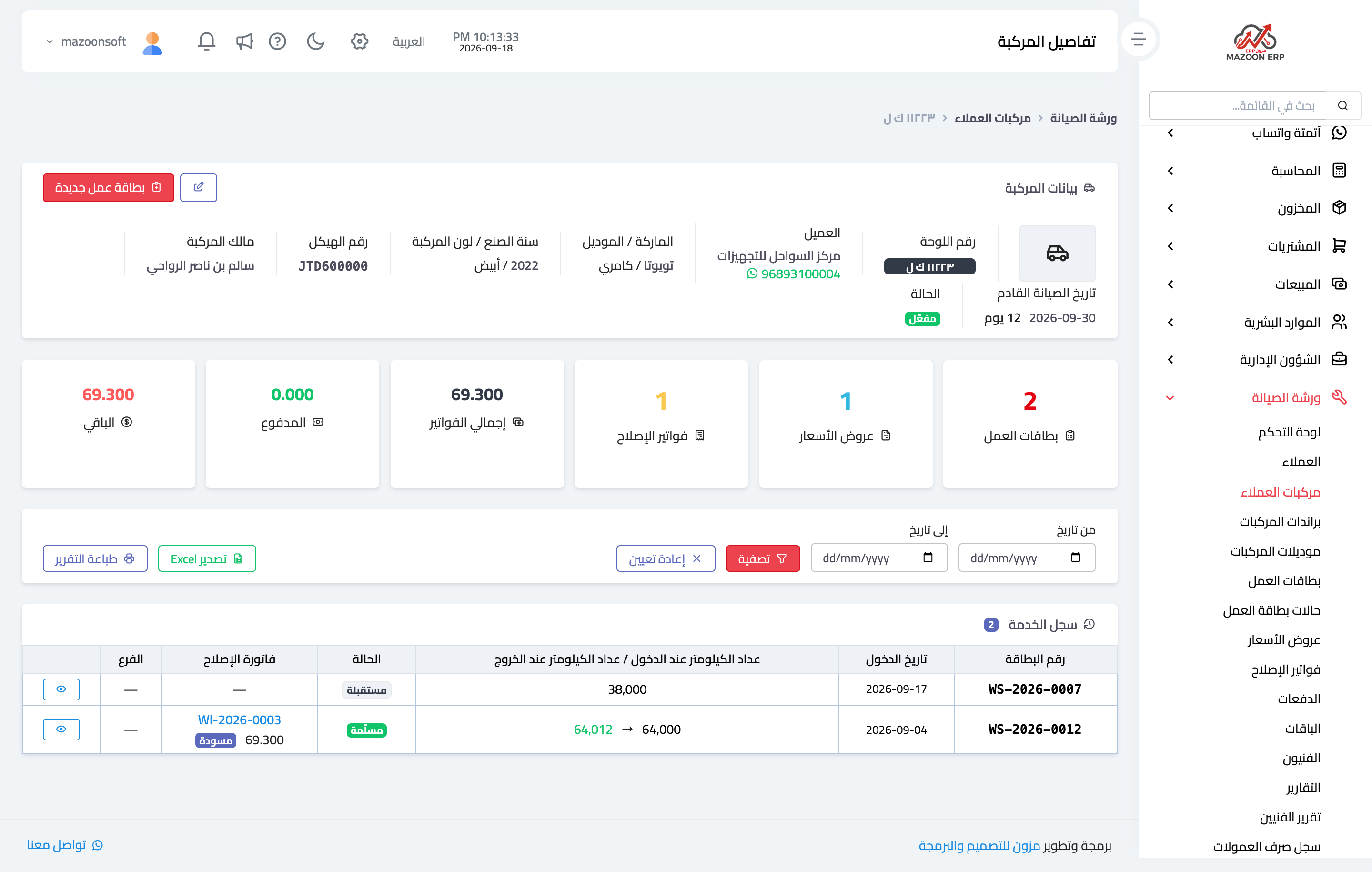
Figure 1
Try what you just read on your own data
Open a free 7-day trial — no credit card, with your own company link in minutes.