
I approved a count or a scrap order — why is there no journal entry?
The balance dropped and nothing moved in the accounts. Usually this is not a fault but an account that is not linked to the event.
How the linking works
The Inventory module does not know your accounts by itself. Whenever a movement deserves an entry, it looks for a link for that event type in Accounting: a debit account and a credit account. If both exist it creates the entry; if not, the movement passes silently and no entry is made.
Where to check
- Open Accounting → Event Account Links — image 1.
- Type inventory in the search box and press Search.
- Confirm there are six rows — two per event, a debit and a credit.
| Event | Debit account | Credit account |
|---|---|---|
| Stock count surplus | Inventory | Stock count gains |
| Stock count shortage | Stock count losses | Inventory |
| Inventory scrap | Inventory scrap loss | Inventory |
These links ship with the standard chart of accounts. Check them if you deleted accounts or rebuilt the chart by hand.
Fixing a missing link
- Press Add New Link.
- Choose the event type, then the account key (debit or credit account), then the account from the chart.
- Set it active and save. Repeat for the other side.
- Test with a small scrap order and check the entry in Accounting → Journal Entries.
Other reasons an entry is missing
- A unit cost of zero. No entry is created for a zero value. An item that entered stock at zero cost produces a variance with no financial value — fix its cost first.
- The event was a manual adjustment. Stock adjustments never produce an entry, by design, because their value was posted by another document. If you expect an entry, use a physical count rather than an adjustment.
- The movement was an ordinary inbound or outbound. Purchases and sales create their entries from the supplier bill and the sales invoice, not from the stock movement — otherwise the amount would be booked twice.
- Only one side of the link exists. A debit account alone is not enough; the entry needs both.
Notes
- This screen changes account numbers without any code change — as the screen itself says.
- Link the accounts before going live; past movements are not re-posted retroactively once a link is fixed.
- Do not point two different events at the same account without reason — you will lose the ability to read scrap losses separately from count variances.
Screenshots
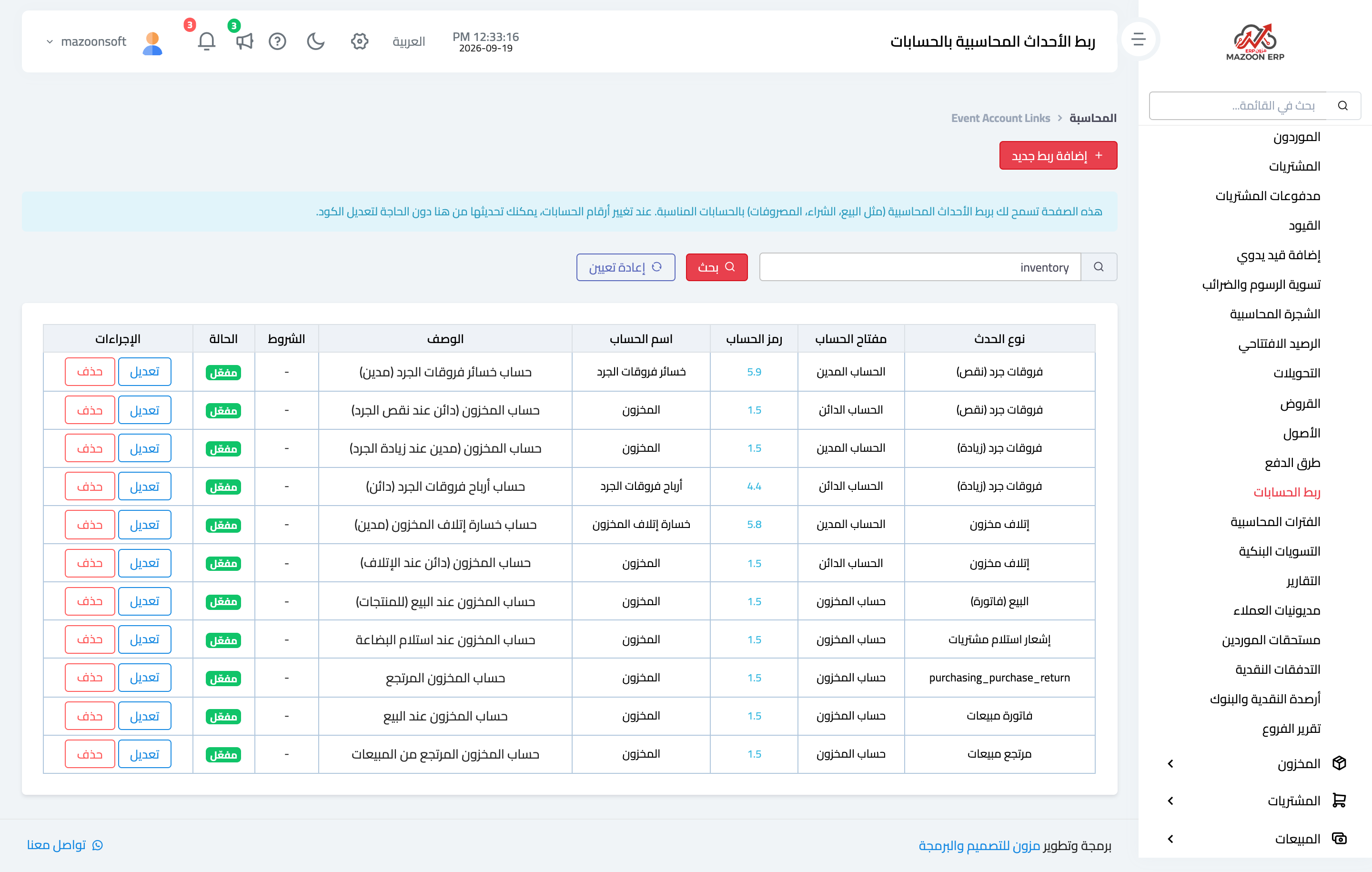
Figure 1
Try what you just read on your own data
Open a free 7-day trial — no credit card, with your own company link in minutes.