
How do I read the inventory balance report and stock value, and export it?
The question "what is my stock worth today?" has one answer in Mazoon: the balance report. It is also the figure your accountant asks for when preparing the balance sheet.
Steps
- Open Inventory → Balance Report — image 1.
- Search by product name or SKU.
- Narrow by branch, warehouse and category.
- Tick Hide items with zero balance to reduce the list to what you actually hold.
- Press Filter, then Export Excel if you want a file.
The columns
- Product with its SKU, then branch and warehouse.
- On hand · reserved · available.
- Average cost — the weighted cost of one unit.
- Stock value — on hand × average cost.
The item count shows above the table, and the overall value appears on the Inventory dashboard, split across branches with percentages.
How is average cost calculated?
By weighted average: each incoming quantity at its price blends with the existing balance to produce a new average. Bought a hundred at ten and then a hundred at twenty? The average is now fifteen. This is why a correct opening stock cost matters so much — getting it wrong pollutes the average for months.
Notes
- The report shows the current position, not a historical one; for the balance at an earlier date use the stock card and follow the movements.
- Value is calculated on the on hand figure, because reserved goods are still yours until delivered.
- Services never appear here, nor do items with Track Stock off.
- An item with zero average cost entered stock at zero cost — check its opening stock or its goods receipt.
- If your account is restricted to a branch, you will only see your branch's balances.
- Export after filtering, not before; the export follows what is on screen.
Screenshots
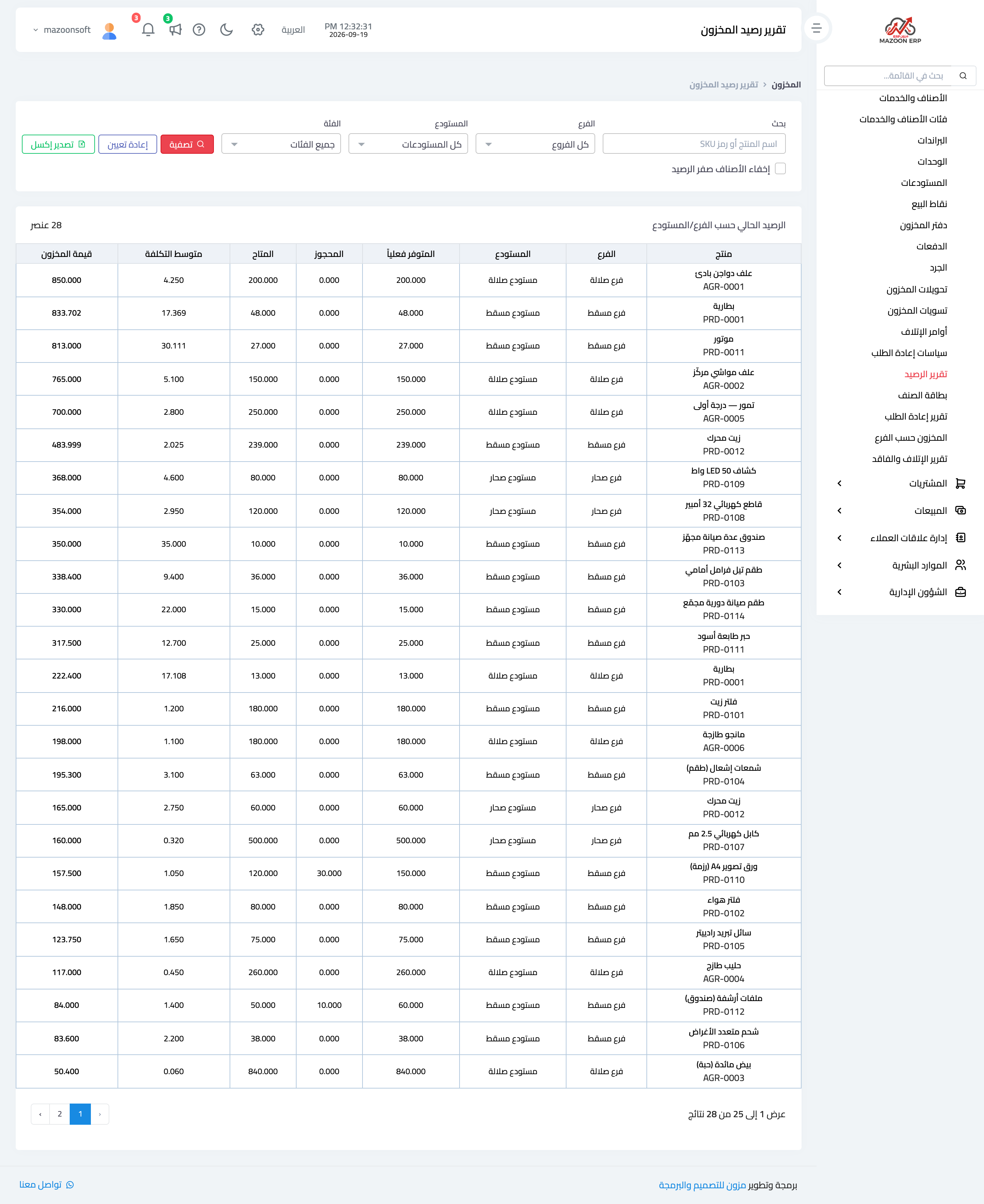
Figure 1
Try what you just read on your own data
Open a free 7-day trial — no credit card, with your own company link in minutes.