
Overview of the Inventory module
The Inventory module answers three questions at any moment: what do I have, where is it, and what is it worth? Every sale, purchase or transfer is recorded in it immediately, so the book balance keeps matching what is actually on the shelf.
The inventory dashboard
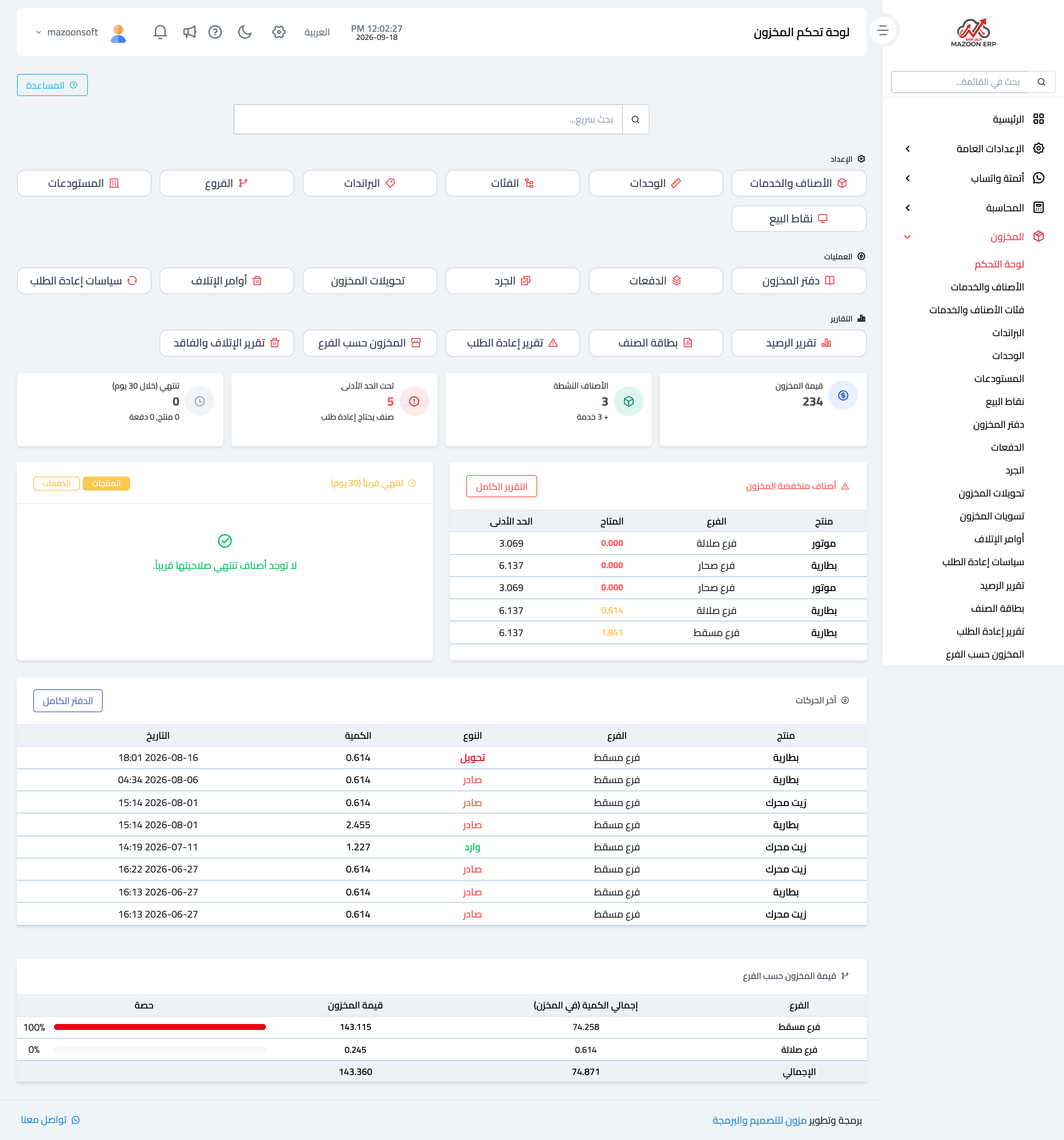
In the sidebar choose Inventory, then Dashboard. The page appears as in image 1. At the top is a quick search that jumps straight to the screen whose name you type.
The cards fall into three groups
- Setup — items and services, units, categories, brands, branches, warehouses, points of sale.
- Operations — stock ledger, batches, stock counts, transfers, scrap orders, reorder policies.
- Reports — balance report, item card, reorder report, stock by branch, scrap and loss report.
What the dashboard tells you immediately
Below the cards are live indicators that save you opening reports in normal circumstances:
- Inventory value — what you hold, at cost.
- Active items — how many products and services are active.
- Below minimum — items at or under their reorder point, with a table underneath showing item, branch, available quantity and minimum.
- Expiring within 30 days — batches nearing expiry, so you can act before they become a loss.
- Latest movements — what came in and went out, with movement type, branch and quantity.
- Inventory value by branch — how the value is distributed and each branch's share.
Recommended order for getting started
- Units — piece, kilogram, box, hour… before any item.
- Categories and brands — classification that makes search and reports easier later.
- Warehouses — and their link to branches.
- Items and services — deciding which ones are stock-tracked and which are not.
- Opening stock per item — before the first sale or purchase.
- Reorder policies — so the system warns you before you run out, not after.
How it relates to the other modules
Inventory is not an island:
- Sales reduce stock when an invoice is approved or a point-of-sale transaction completes.
- Purchasing increases it when goods are received.
- Manufacturing consumes raw materials and produces the finished item.
- Accounting receives inventory value and cost of sales in its accounts.
This is why a balance should never be edited by hand to paper over a difference. Every difference has a cause, and the place to correct it is a stock count or a stock adjustment — both of which leave a clear trace in the stock ledger.
Screenshots
Try what you just read on your own data
Open a free 7-day trial — no credit card, with your own company link in minutes.