
Manual stock adjustment vs physical stock count: which one, and when?
On the surface both screens do the same thing: correct a quantity. But the difference between them is accounting, not stock — and it is the single most important distinction in the whole Inventory module.
The rule in one line
- Manual adjustment — corrects a recording error. Produces no journal entry.
- Physical stock count — records a real gain or loss. Produces a journal entry.
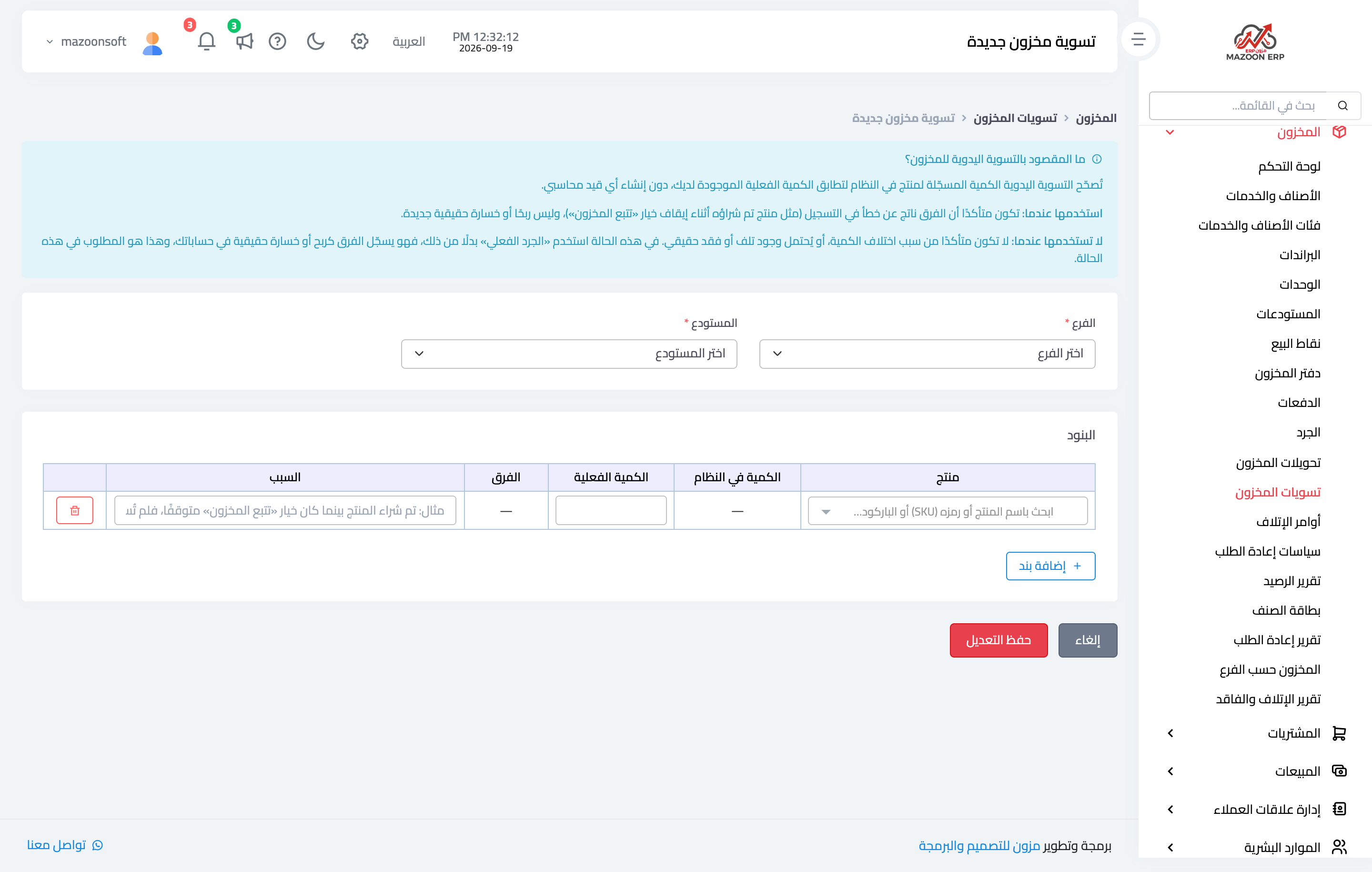
The screen itself warns you about this before you begin — image 1.
When to use a manual adjustment
When you are certain the difference is a recording mistake rather than a genuine shortfall:
- An item bought while Track Stock was off, so the quantity was never recorded, and tracking was turned on later.
- Opening stock entered with the wrong quantity.
- A movement posted to the wrong warehouse and already corrected there.
In these cases the financial value was already posted by another document (the supplier bill, for instance), so a second entry here would book the same amount twice. That is why an adjustment produces no entry — deliberate behaviour, not a gap.
When to use a physical count
When you do not know why the difference exists, or you know it is a real loss: theft, damage, leakage, a short delivery nobody caught. Here the business really lost money, and the accounts must show it.
Steps: a manual adjustment
- Open Inventory → Stock Adjustments and press New Stock Adjustment.
- Pick the branch, then the warehouse.
- Search for the product; the system fills in the system quantity automatically.
- Enter the actual quantity and the difference is calculated in front of you.
- Write the reason — a useful sentence, not one word.
- Press Add line for each item, then Save Adjustment.
The adjustment applies immediately with no approval step, and appears in the stock ledger as type adjustment.
Notes
- A manual adjustment has no approval and no undo. Restrict the permission to people who understand its effect.
- The reason is free text but it is the most valuable thing in the record — six months later it is the only evidence the adjustment was justified.
- If you hesitate between the two screens, choose the physical count; it is safer for a loss to appear in the accounts than to be hidden.
- Repeated adjustments on the same item point to a data-entry problem, not a stock problem — go and find the root cause.
Screenshots
Try what you just read on your own data
Open a free 7-day trial — no credit card, with your own company link in minutes.