
How do I import items in bulk from an Excel file?
Entering three hundred items by hand is a full day's work. Importing turns it into minutes — provided your file matches the template.
Steps
- Open Inventory → Items & Services and press Import Items & Services — image 1.
- Press Download Template and open it in Excel.
- Fill one row per item, then save the file.
- Come back to the same dialog, choose the file and press Import.
- Wait for the import result page.
Template columns
- name — the item name, required. A row with no name is skipped.
- sku — the item code. If it matches an existing item, that item is updated instead of a new one being created — the easiest way to update prices in bulk.
- type — one of product, service or raw_material. Empty or unrecognised becomes product.
- barcode — optional.
- unit_code — must match the code of a unit that already exists, otherwise it is ignored.
- category_name and brand_name — must match the Arabic or English name of an existing category or brand, otherwise they are ignored.
- cost_price and sale_price — empty means zero.
- tax_rate — a percentage; empty means zero.
- track_stock — 1 tracked, 0 not tracked. Empty = 1.
- is_active — 1 active, 0 inactive. Empty = 1.
- notes — free text.
The result page
After the upload the page reports the total, the newly imported, the updated, the skipped and the failed. A download errors CSV button gives you the rows that did not go through, each with its reason, so you can fix and re-upload only those.
Notes
- Accepted formats: xlsx, xls and csv; the screen states a 5 MB limit.
- Create your units, categories and brands before importing — the import does not create them and ignores anything that does not match.
- Importing does not bring balances. After the items exist, enter opening stock for each or receive them on a purchase goods receipt.
- Test with ten rows and check the result before uploading three hundred.
- Large files can take a minute; do not close the page or press the button again.
- Categories and brands have their own separate import on their own screens.
Screenshots
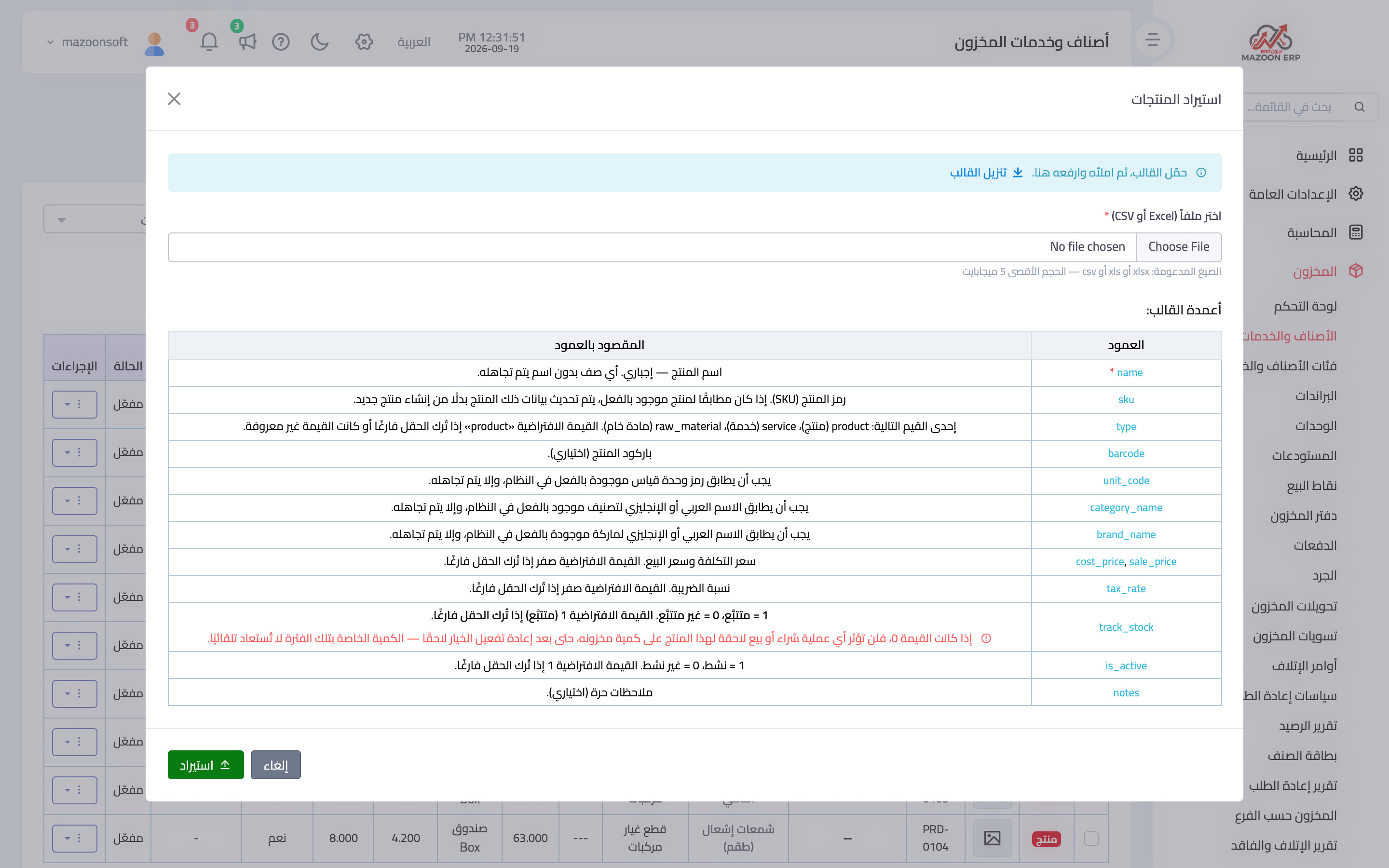
Figure 1
Try what you just read on your own data
Open a free 7-day trial — no credit card, with your own company link in minutes.