
The Inventory dashboard: what do the numbers tell me?
The Inventory dashboard is the screen you open every morning before anything else. In one minute it tells you what your stock is worth, what is about to run out, what is about to expire, and what happened yesterday — image 1.
The four cards
- Stock value — the total value of every item at its average cost. This is your asset figure.
- Active items — the number of active products, with the service count shown separately below.
- Below minimum — how many items need reordering right now.
- Expiring within 30 days — everything approaching expiry, broken down underneath into products and batches.
The tables
- Low stock items — item, branch, available and minimum, in red where it has hit zero and amber where it is close. Full report takes you to the reorder report.
- Expiring soon — two tabs: products (a date on the item) and batches (a date on the lot), with the days remaining on each row.
- Latest movements — what just happened in the store: product, branch, type, quantity and time. The quickest way to spot something unexpected. Full ledger opens the stock ledger.
- Stock value by branch — total quantity, stock value and a percentage share with a visual bar for each branch, plus a total row.
The shortcuts
Three groups of quick links sit at the top: setup (items, units, categories, brands, branches, warehouses, POS terminals), operations (ledger, batches, counts, transfers, scrap orders, reorder policies) and reports (balance, stock card, reorder, stock by branch, scrap). A quick search box jumps straight to any item.
Notes
- Stock value is calculated on the on hand figure; the gap between it and available value is what is reserved for sales orders.
- A branch holding 52% of the value means stock is concentrated in one place — worth a look if sales are spread evenly.
- "Below minimum" only counts items with a reorder policy; a zero on that card may mean you have not set the policies up rather than that everything is fine.
- Is the "expiring within 30 days" card empty? Either nothing is close, or expiry dates are not being entered on goods receipts.
- Make this screen a morning habit; five minutes here saves a lot of afternoon phone calls.
Screenshots
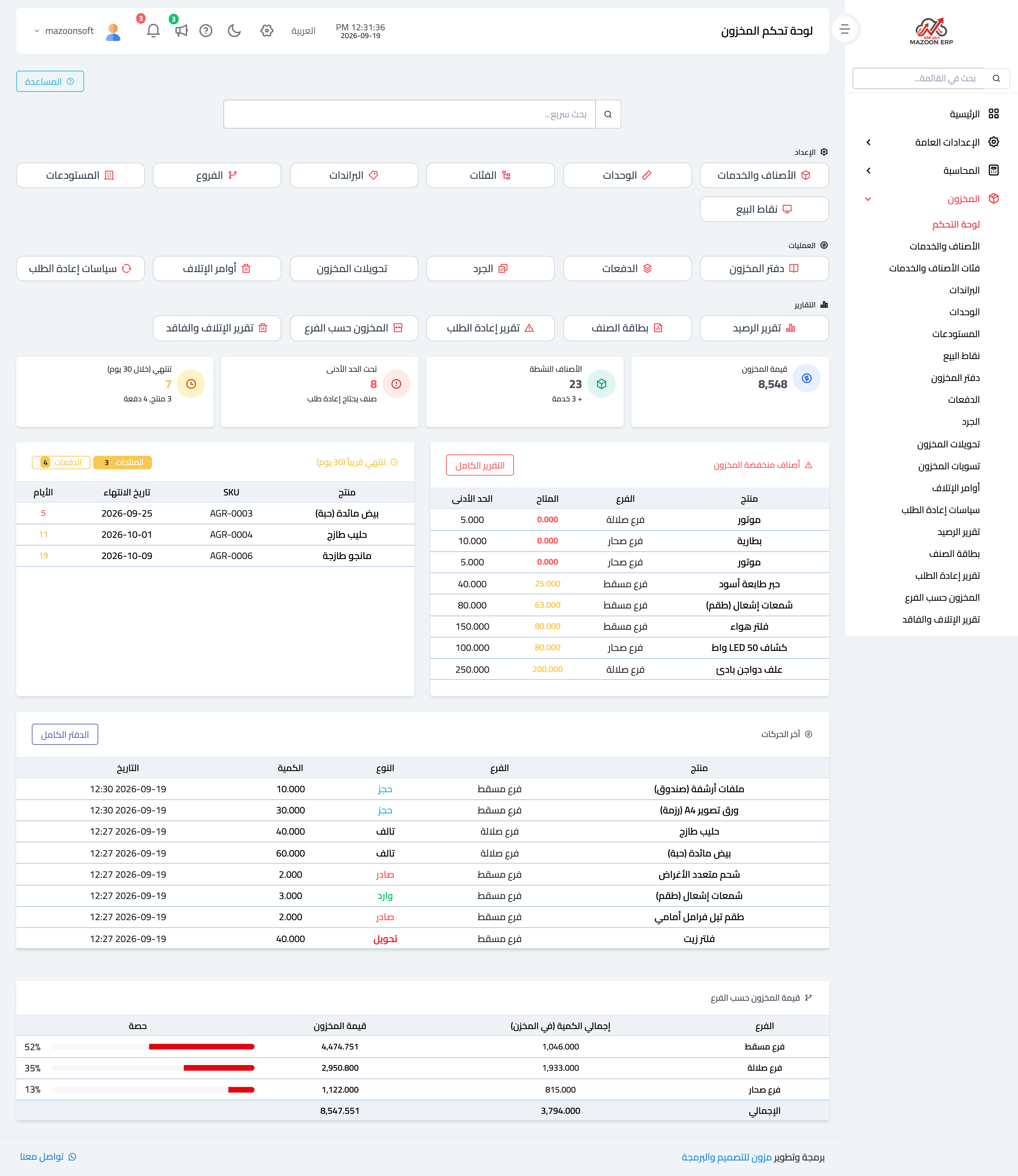
Figure 1
Try what you just read on your own data
Open a free 7-day trial — no credit card, with your own company link in minutes.