
What are batches (lots), and how do I watch expiry dates?
Two hundred sacks of feed in the store, but they are not the same: one shipment arrived in March and another in June, each with its own expiry date. A batch (or lot) is the group of units that arrived together under one number with one expiry date.
Where a batch comes from
Batches are not created on the batches screen — that screen is for monitoring. A batch is created automatically when a goods receipt carries a lot number:
- Open Purchasing → Receiving and create a goods receipt.
- On each line fill in the Lot Number (optional) and the expiry date.
- When the receipt posts, the system creates the batch with its quantity, cost and dates.
A line left without a lot number enters stock with no batch — perfectly fine for anything that does not need tracing.
Monitoring batches
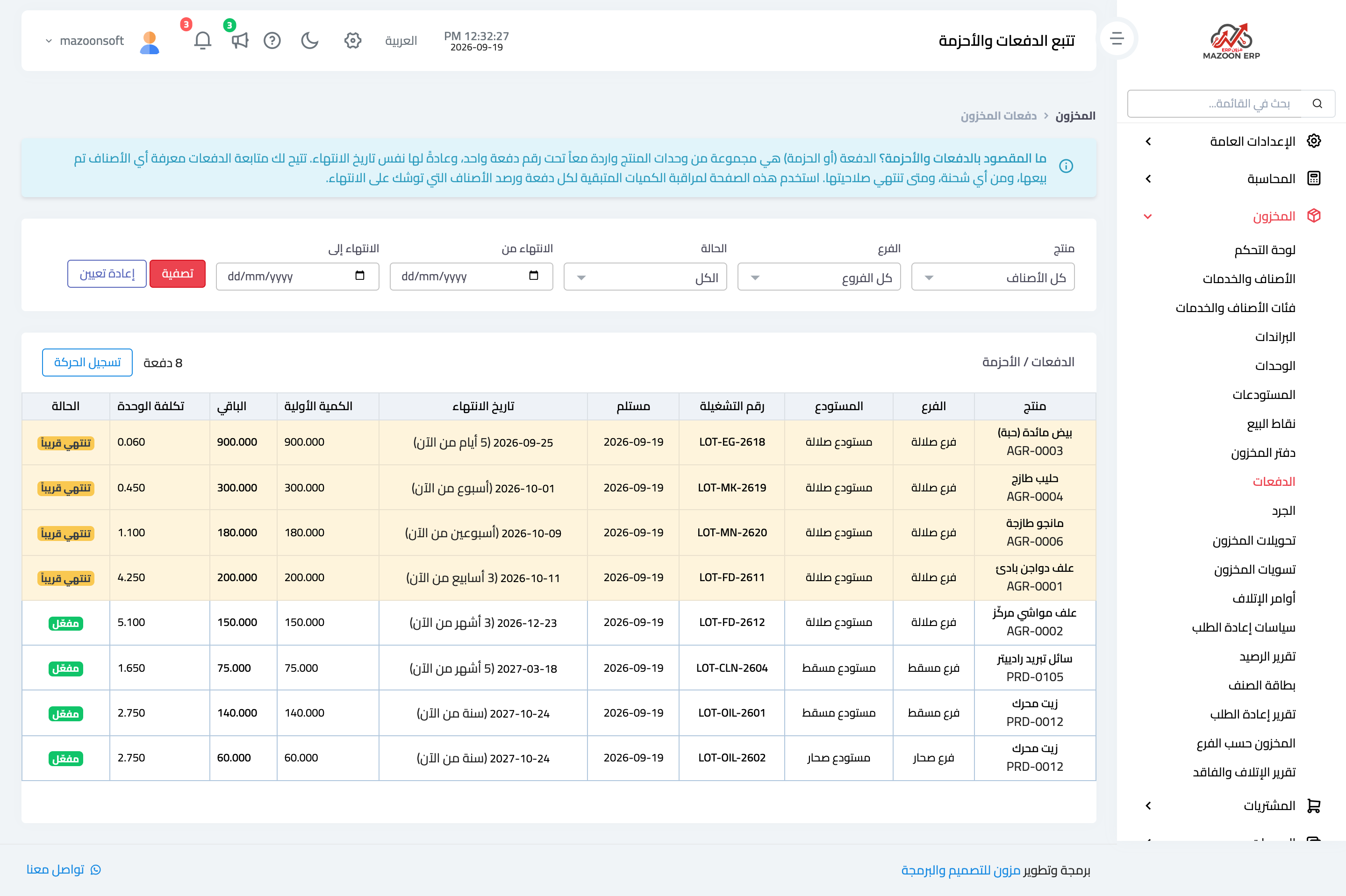
Open Inventory → Batches — image 1. The table shows each batch's product, branch, warehouse, batch number, received date, expiry date with the remaining time in words, initial quantity, remaining quantity, unit cost and status.
Statuses
- Active — valid and far from expiry.
- Expiring soon — inside the warning window, with a yellow badge.
- Expired — past its date.
- Depleted — nothing left.
The filters narrow by product, branch, status and expiry date range.
The automatic alert
The Inventory dashboard shows an expiring within 30 days card combining products and batches approaching expiry, and the system sends a daily notification for items expiring in the next thirty days.
Two levels of expiry
- A date on the item itself — entered on the item form, right for something with one date that does not vary between shipments.
- A date on the batch — more precise, because each shipment carries its own.
Notes
- A batch is unique by four things: product, branch, warehouse and lot number. The same number in another warehouse is a different batch.
- A further receipt with the same number in the same warehouse is added to the existing batch rather than creating a new one.
- The Post Movement button at the top of the screen takes you to the stock ledger; it does not post anything itself.
- Use batches where the goods demand it: food, feed, medicines, building chemicals. Do not force them onto screws and cables.
- Expiry tracking begins at the goods receipt. Make filling in the lot number and expiry date a standing rule when receiving, or this screen stays empty.
Screenshots
Try what you just read on your own data
Open a free 7-day trial — no credit card, with your own company link in minutes.