
Purchase orders: creating one and converting from a request
A purchase order is what you actually send the supplier: agreed items, quantities and prices, with an expected delivery date. It is the document every later receipt is measured against.
Steps
- Open Purchasing → Purchase Orders and press + Create, or convert an approved purchase request.
- Pick the supplier — the system accepts only a contact holding the supplier role.
- Pick the branch and warehouse.
- Set the order date and the expected date.
- Enter the lines with the agreed quantities and prices.
- Write your notes — supply and payment terms belong here.
- Save, then open the order and press Approve — image 1.
Why approval matters here
A goods receipt can only be created against an approved or partial purchase order. Approval is what opens receiving, and the message "Goods receipt can only be created for approved purchase orders" simply means you forgot to approve the order.
The five statuses
- Draft — editable and deletable, with no receiving against it.
- Approved — sent to the supplier and open for receiving.
- Partial — some of it arrived. The system moves here by itself after the first short receipt.
- Completed — everything arrived. Automatic as well.
- Cancelled.
The tracking is fully automatic: each line carries ordered, received and billed quantities, updated with every goods receipt and every approved bill.
Notes
- A purchase order moves no stock and no accounts, whatever its status; the goods receipt is what brings stock in.
- An approved order cannot be edited; cancel it and raise another if the terms change.
- Converting from a request copies the lines and stores the request number on the order.
- You cannot receive more than the order's remaining quantity — the system refuses with a plain message, a useful guard against double receiving.
- Set the expected date honestly; it is what you will measure supplier delays against.
Screenshots
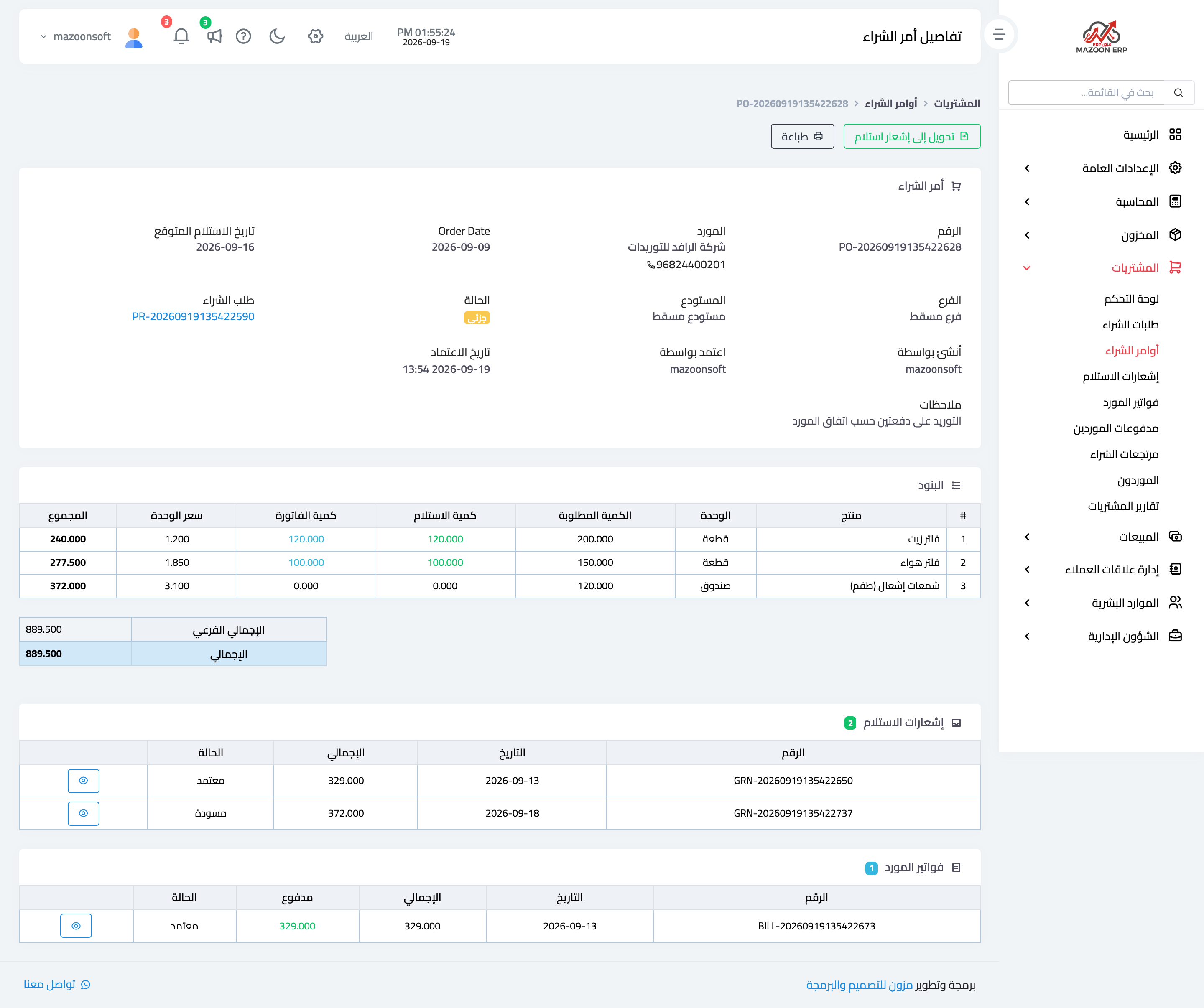
Figure 1
Try what you just read on your own data
Open a free 7-day trial — no credit card, with your own company link in minutes.