
Overview of the Human Resources module
The HR module brings everything about an employee into one place: their file and documents, contract, attendance, leave, pay, appraisal, all the way to offboarding. It is connected to Accounting, so a payroll run creates its entry automatically.
The HR dashboard
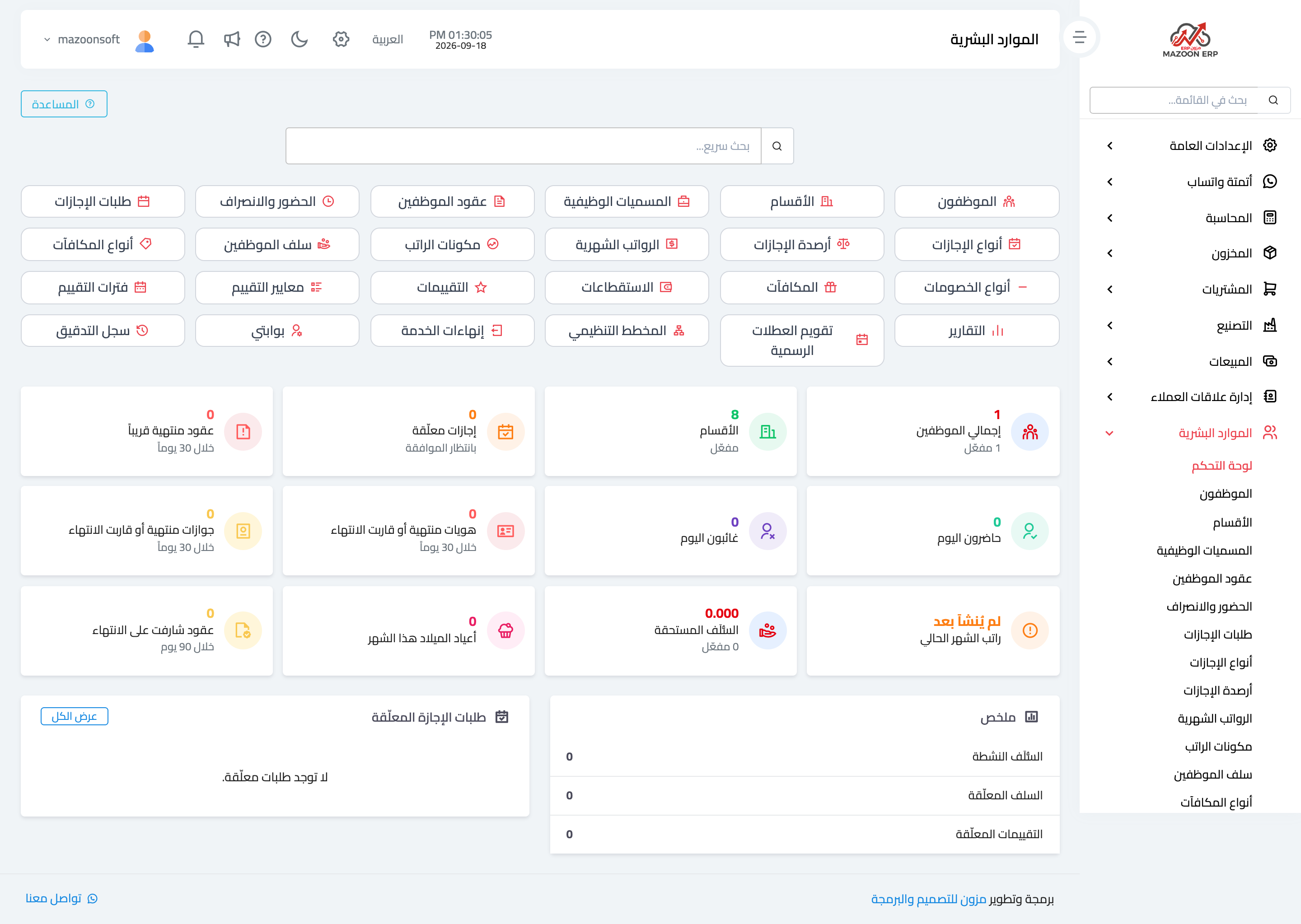
In the sidebar choose Human Resources, then Dashboard — image 1 — with a quick search at the top that jumps to any screen by name.
Card groups
- Foundations — employees, departments, job titles, employee contracts.
- Attendance and leave — attendance, leave requests, leave types, leave balances, the public holiday calendar.
- Payroll — monthly payroll, salary components, employee advances, bonus types, deduction types, bonuses, deductions.
- Development and exit — appraisals, appraisal criteria, appraisal periods, offboarding.
- Other — organisation chart, reports, my portal, audit log.
What the dashboard warns you about
The indicators below the cards are not decoration; they are warnings that arrive before the problem:
- Pending leave requests awaiting your approval.
- Contracts expiring within 30 days, and contracts approaching expiry within 90 — enough time to renew before someone works without a valid contract.
- Expired or expiring IDs and passports — a compliance matter, not just tidiness.
- Present and absent today.
- Outstanding advances and this month's payroll (which reads "not created yet" until you run it).
- Birthdays this month.
Recommended order for getting started
- Departments and job titles.
- Salary components (basic, allowances, deductions) and bonus and deduction types.
- Leave types and the public holiday calendar.
- Employees with their files and documents.
- Contracts per employee, with pay and allowances.
- Then daily operation: attendance, leave, and the monthly payroll run.
Permissions and data privacy
HR data needs permission control more than most: pay, appraisals and offboarding should not be visible to everyone who opens the module. See the roles and permissions article and confine these screens to a narrow role.
The audit log screen shows who viewed and changed what inside the module — your reference for any question about a change to a salary or a contract.
Screenshots
Try what you just read on your own data
Open a free 7-day trial — no credit card, with your own company link in minutes.