
What does the store dashboard show?
This is the first page you open each morning, and where you set off to the rest of the store screens.
What it shows
- Total orders, total orders amount, revenue this month and average order value — Figure 1.
- Pending store orders, which is the first thing you should look at.
- Revenue — last 14 days as a chart, top products, and recent orders with a WhatsApp button per customer.
- Quick links to every store screen, plus a View Store button to open it the way a visitor sees it.
A suggested daily routine
- Start with pending orders: confirm the payment or call the customer.
- Prepare what is in processing and move it to shipped.
- Review top products weekly and make sure they do not run out of stock.
Notes
- Average order value is the most useful number on the page; raising it is easier than doubling your visitors.
- A best-selling product at zero stock is a double loss: a sale missed and a visitor let down.
- Open View Store at least once a week; what looks fine on the dashboard can look broken to a visitor.
Screenshots
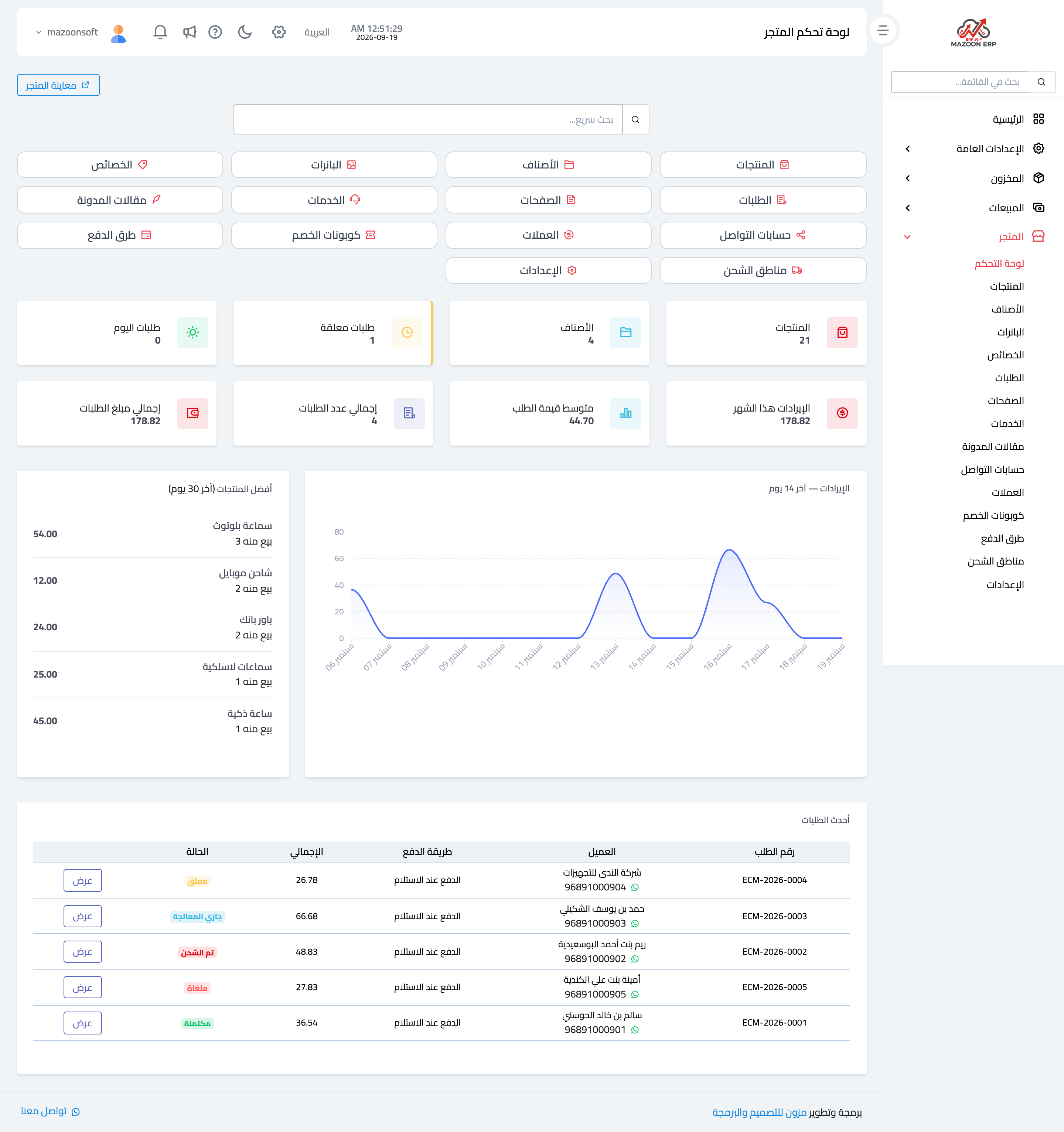
Figure 1
Try what you just read on your own data
Open a free 7-day trial — no credit card, with your own company link in minutes.