
How do I set the site identity, contact details and the “About Us” text?
This screen is the source of everything that repeats across your site: the name, the logo, the phone number and the address.
Identity
- Open Website Builder → Settings — Figure 1 — then the Identity tab.
- Enter the site name and the tagline in both languages.
- Upload the logo and the favicon; a logo with a transparent background works far better.
About Us
On the Content tab write the About Us title and body in both languages and upload an accompanying image. Three short paragraphs are enough: who you are, how you work, and why people trust you.
Contact details
- On the Contact Us tab enter the phone, WhatsApp, email and address in both languages.
- Paste the map embed code: open your location in Google Maps, click Share, then “Embed a map”, and copy the
iframe. - Press Save.
Notes
- The WhatsApp number is what enables the floating WhatsApp button; the switch that shows it lives on the Appearance page.
- The larger sections — services, team, gallery, vision and mission — each have their own screen in the Website Builder menu, not here.
- Write the full address and set the map; a site with no clear address lowers a visitor’s trust.
Screenshots
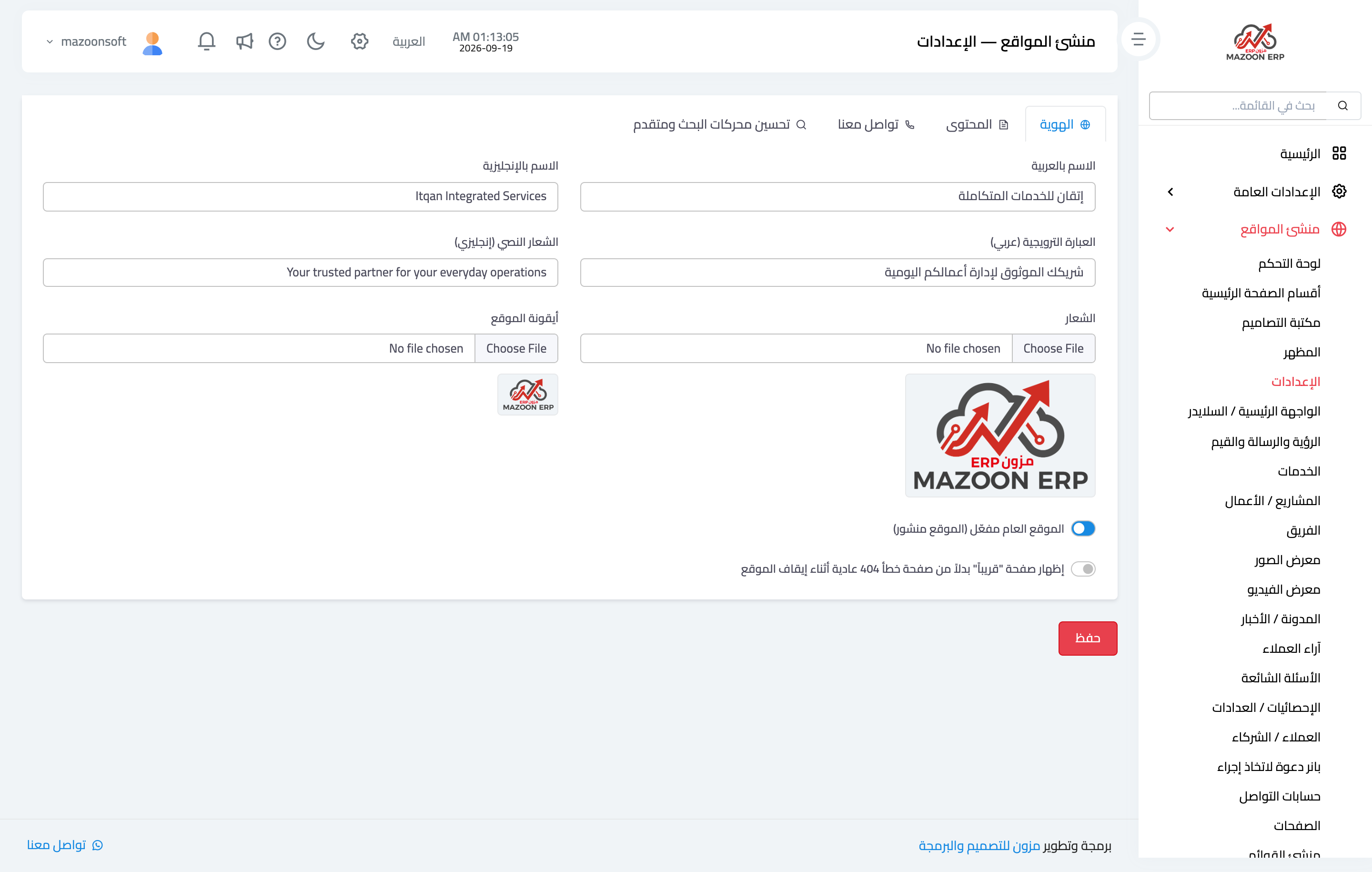
Figure 1
Try what you just read on your own data
Open a free 7-day trial — no credit card, with your own company link in minutes.