
How do I set up payment methods and online payment?
Payment methods serve two purposes: what the site accepts from a customer, and linking each method to the right accounting entry.
Steps
- Open Halls & Chalets → Payment methods — Figure 1.
- Enable the methods you actually accept and disable the ones you do not use.
- For each method set the matching accounting payment method, where the receipt is posted.
- For online payment: enter the gateway keys, the currency and the webhook URL.
- Start in test mode and run a full transaction before opening it to customers.
What is actually paid online?
The site collects the advance payment amount you set in the settings, or the full amount if you required it. The balance is collected by you before the event.
Notes
- Linking the method to accounting saves you manual entries at month end; set it up from the start.
- Register the webhook URL with your provider; without it a customer may pay without their booking being confirmed automatically.
- Remember to turn test mode off when you go live.
- A method left enabled but unused confuses staff and muddles your cash reports.
Screenshots
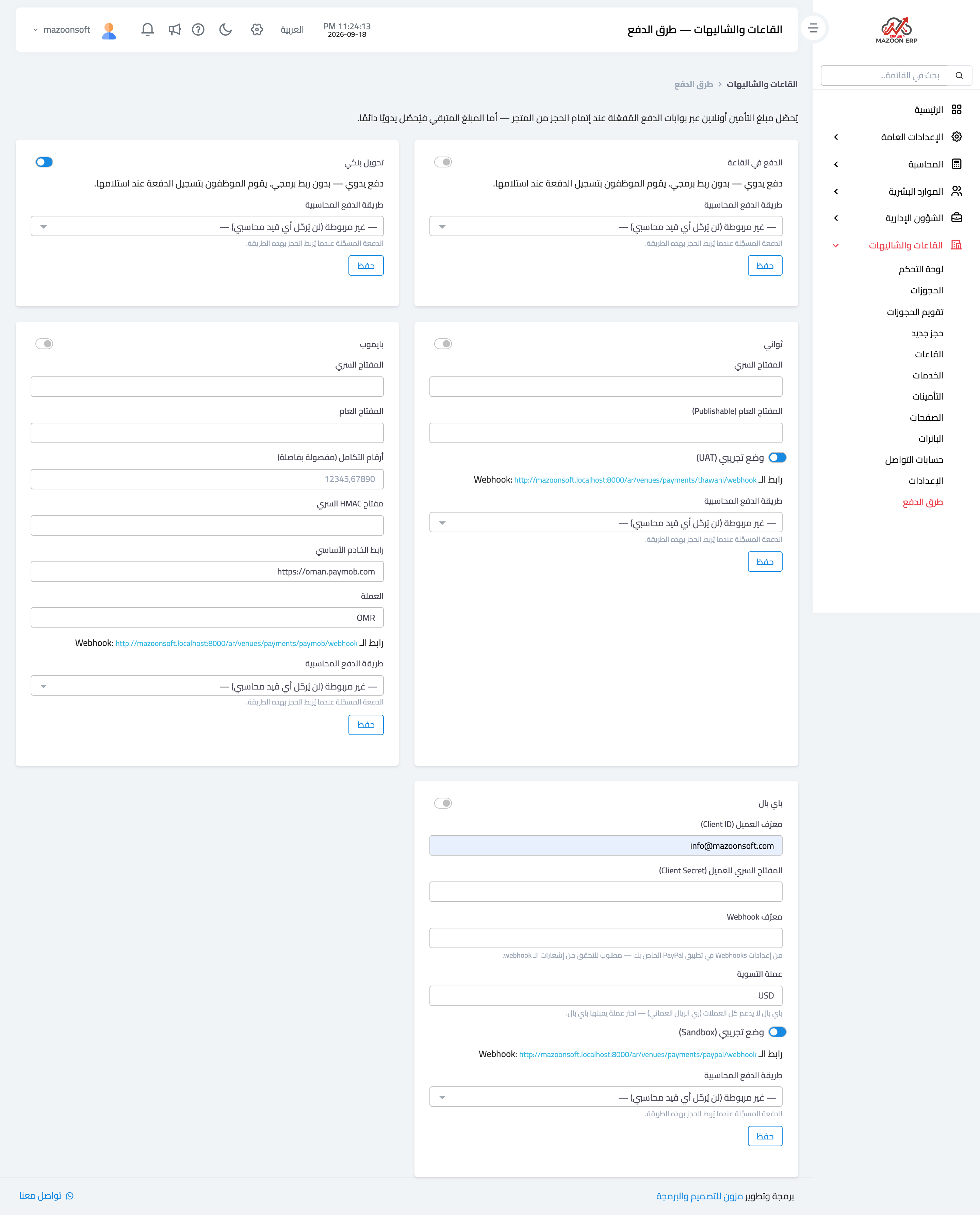
Figure 1
Try what you just read on your own data
Open a free 7-day trial — no credit card, with your own company link in minutes.