
What does the engineering dashboard show, and what is the client portal?
This is the first page you open each morning, and where you set off to every screen in the office.
The dashboard
- At the top are quick links to clients, proposals, contracts, projects, site visits, drawings, invoices and reports — Figure 1.
- The department cards show the project and member count in each one.
- Counters: projects, proposals (draft/sent), active contracts and their value, and the outstanding sub-consultant amount.
The client portal
The client has a separate portal they sign into, where they see their proposals, contracts, projects and invoices, and follow the phase completion themselves. To enable it, turn the portal on for that contact from the client page.
A suggested weekly routine
- Open RFIs and open NCRs.
- Completed phases not yet invoiced — this is your forgotten money.
- Invoices past their due date.
- Projects that have not moved between departments for a while.
Notes
- The dashboard numbers are only honest if phase statuses are kept up to date as work happens.
- The client portal cuts phone calls considerably, but it also means the client sees your delays.
- Make reviewing the dashboard a fixed weekly habit, not something you do only in a crisis.
Screenshots
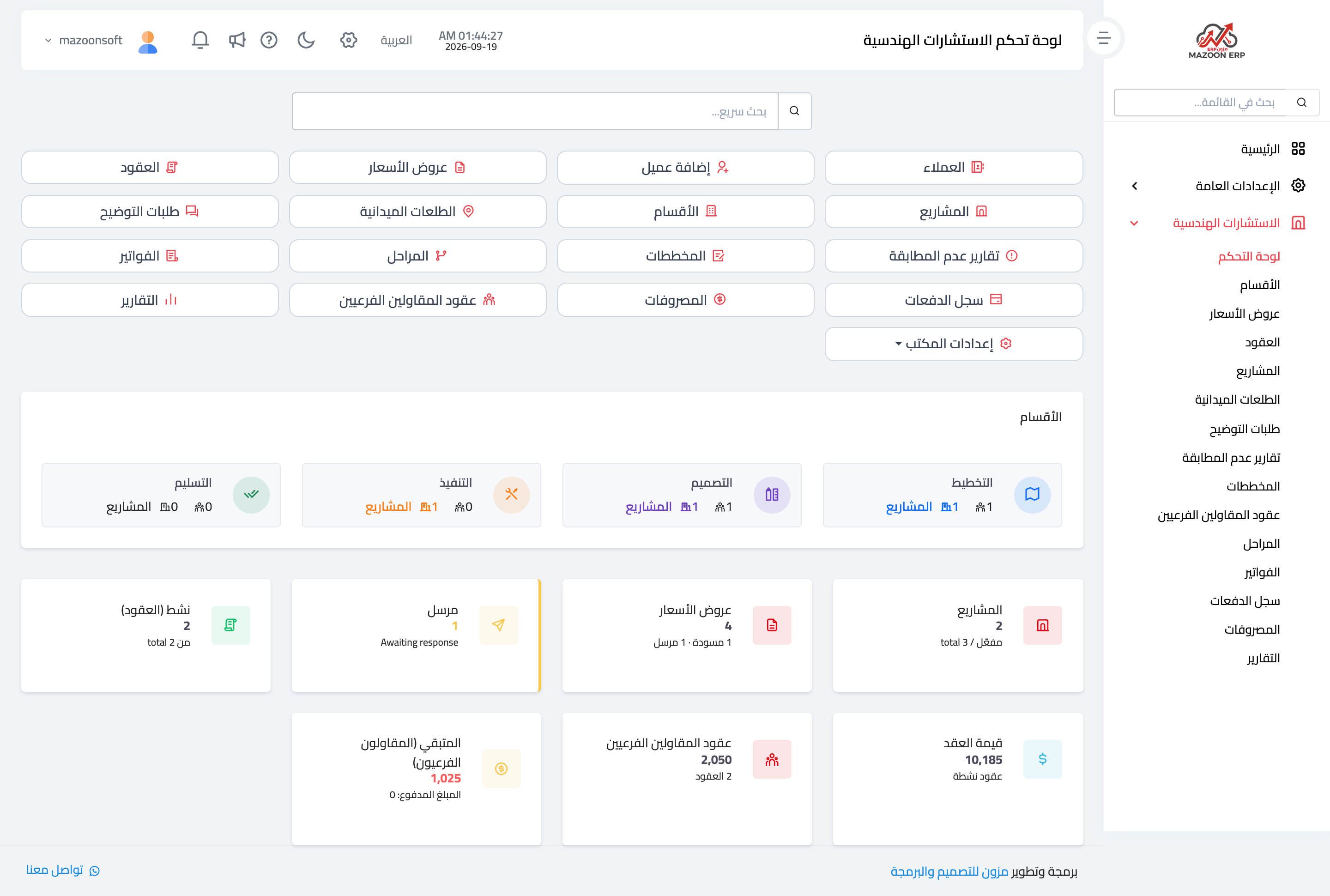
Figure 1
Try what you just read on your own data
Open a free 7-day trial — no credit card, with your own company link in minutes.