
How do I send the contract to the guardian for electronic signature?
A queue of guardians waiting to sign contracts is a familiar scene in the registration season, and the signing link ends it.
Steps
- Open the contract — Figure 1 — and at the bottom there is a guardian signature section.
- To sign at the school: press Sign now and hand the guardian the device to sign with a finger.
- To sign remotely: press Send via WhatsApp, or copy the signing link and send it yourself.
- The guardian opens the link and sees the whole contract with its items and amounts, with no account needed in the system.
- As soon as they sign, a signed tag appears with the signing date and time.
- Print the contract with Print contract and keep a copy in the student’s file.
Notes
- Check the items and amounts before sending the link; editing after signature empties it of meaning.
- A signature on the link is as binding as one on paper, and it is recorded with its date and time.
- Do not hand over books or start the year before the contract is signed; an unsigned contract will not protect you in a fee dispute.
- A promissory note prints from the same page and is the extra security most private schools use.
Screenshots
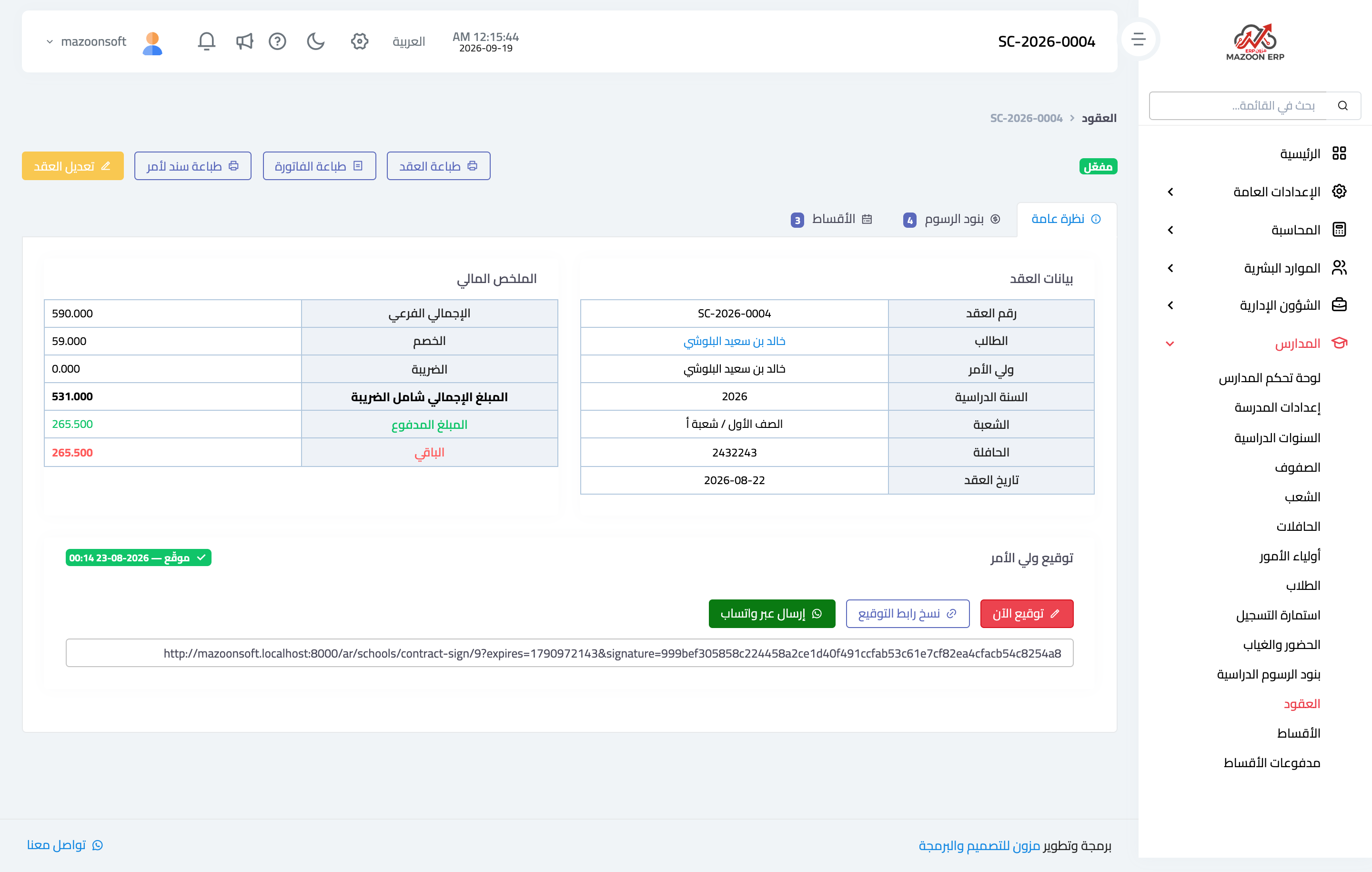
Figure 1
Try what you just read on your own data
Open a free 7-day trial — no credit card, with your own company link in minutes.