
How do I follow the orders list and change an order’s status?
The orders list is the laundry’s working board for the day: it tells you what came in, what is finished, and what is running late.
Following the work
- Open Laundry → Orders — Figure 1.
- Filter by status, branch or order date from/to, or search by order number or customer name.
- Every row shows the total, the paid amount and the remaining, with the status in its colour.
- To take it into a spreadsheet, press Export CSV.
Changing the status
- Press Update status on the order’s row, or open the order page and change it there.
- Pick the new stage (washing, ironing, ready, delivered…) and press Update.
- Choosing Delivered records the delivery date automatically.
Notes
- Do not move an order to Delivered while an amount is still outstanding unless you have agreed it with the customer; the remainder stays as a debt in the system.
- Filter by Ready every evening and call those customers; it is the fastest way to clear your shelves.
- A cancelled order stays in the list for the record and is not counted in revenue.
Screenshots
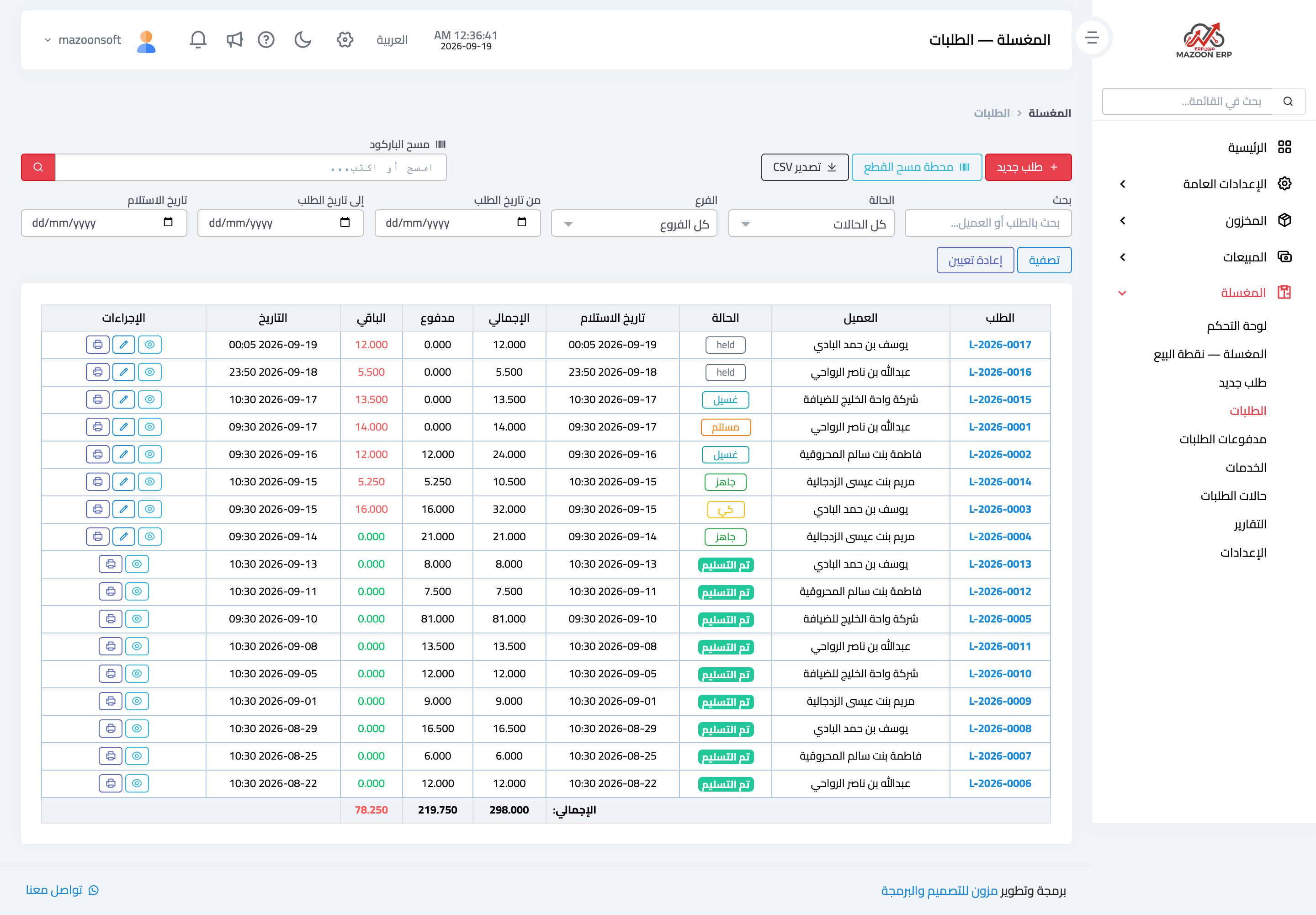
Figure 1
Try what you just read on your own data
Open a free 7-day trial — no credit card, with your own company link in minutes.