
Journal entries and manual entries
An entry is the accounting trace of every movement: a debit side and a credit side of equal value. Most entries in Mazoon are created automatically from documents — invoices, vouchers and expenses — so the journal screen is mostly for review rather than input.
The entries list
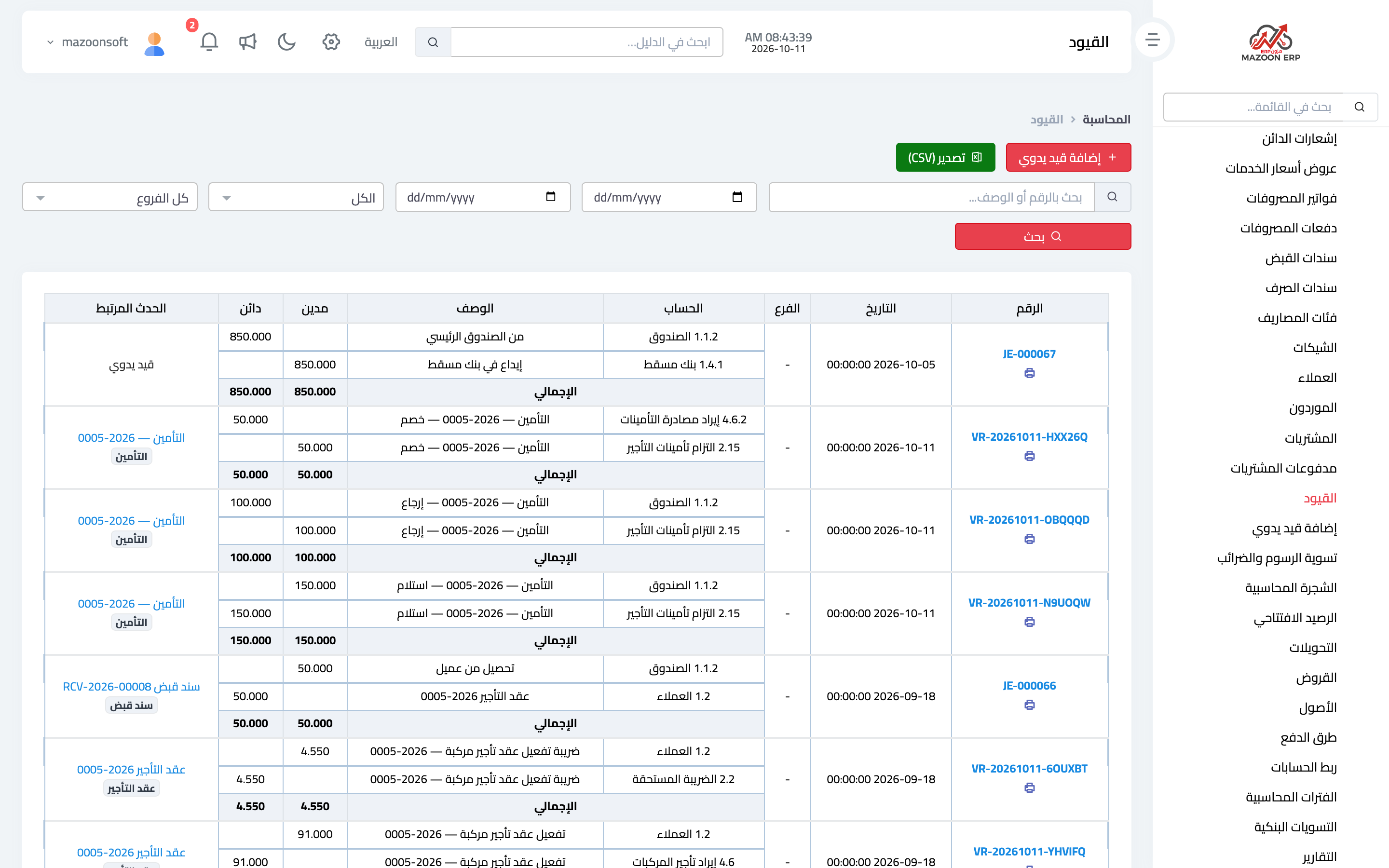
From the Accounting panel open the Journal Entries card. Entries appear as in image 1: entry number, date, description, the document that created it, and total debits and credits.
Open any entry to see its lines: the accounts affected and the amount on each side. This is the fastest way to answer "why did this account's balance change?" — start from the account, then go from the entry to its document.
Under the number of every manual entry in the list are Edit (while its period is open) and Copy Entry icons, next to the print icon.
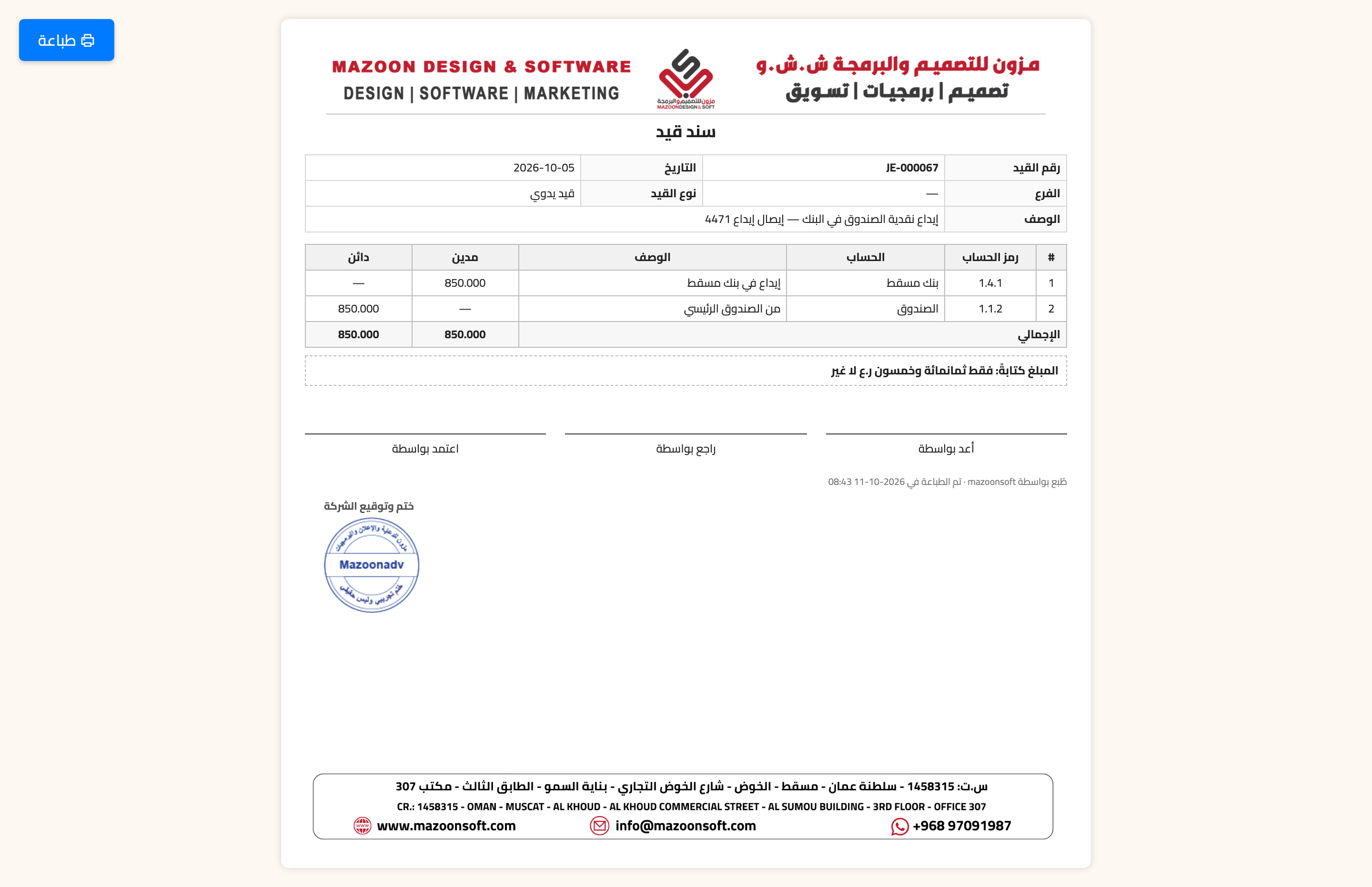
Every entry — manual or automatic — has a printable journal voucher from the Print button on the entry page, or the print icon under its number in the list — image 3: it carries your company letterhead, the entry number, date and branch, its type and source document, the lines with account codes, the amount in words, and signature boxes. The voucher warns if the entry is not balanced.
The descriptions the system writes on automatic entries use one language for the whole business, chosen under General Settings → Settings → Regional & Display → Accounting entries language.
The manual entry
The Add Manual Entry card is for what has no operational document: income tax accruals, period-end adjustments, depreciation, provisions and accounting corrections. Sales, purchase and expense invoices and collections are better recorded from their own screens, which reach the VAT return and the customer and supplier statements by themselves.
In the header of the Entry Lines section, Instructions: VAT in a manual entry opens a short explanation with examples; click it again to fold it.
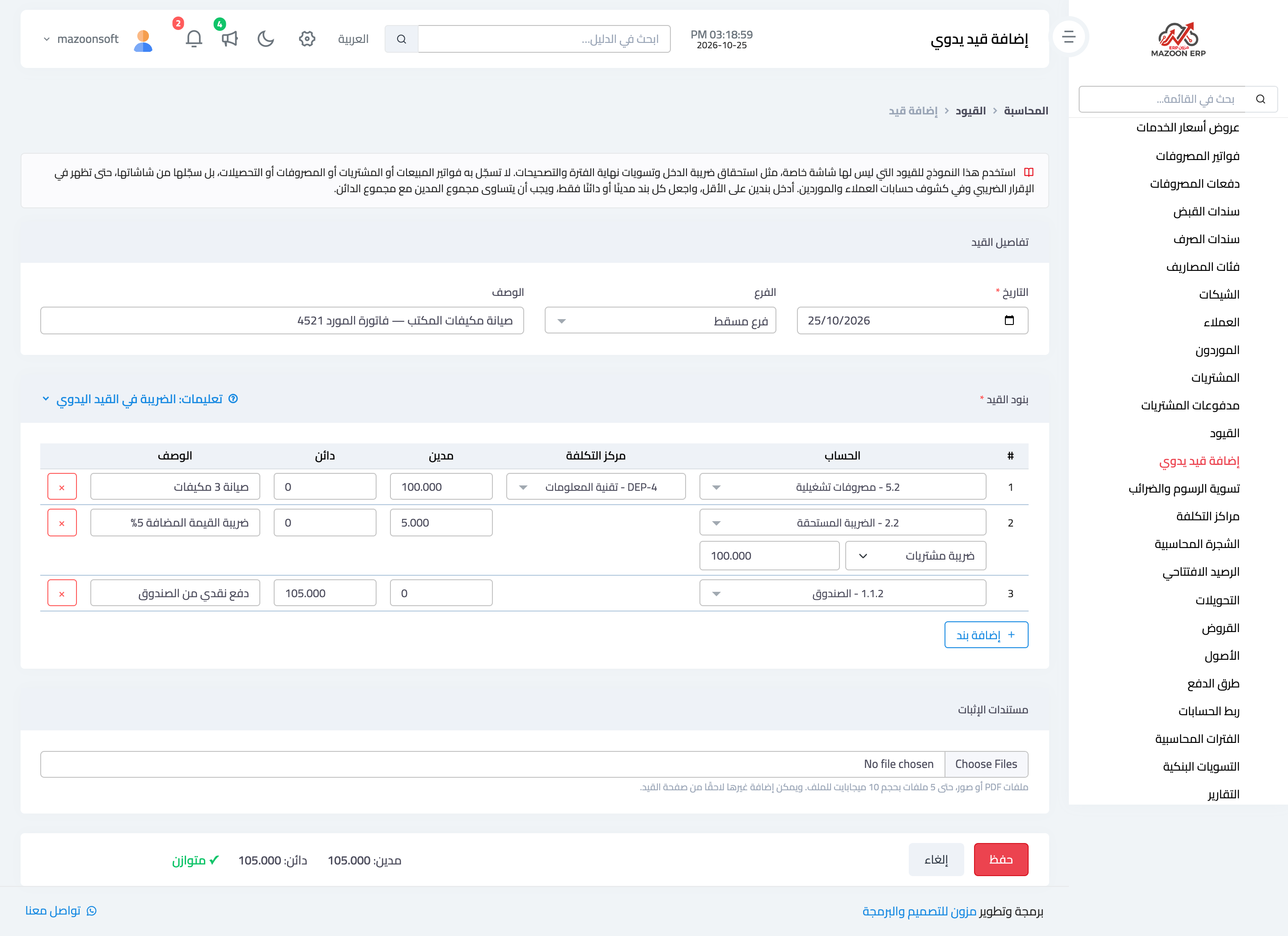
The page is shown in image 2: an Entry details section (date, branch and description), then Entry Lines, then Supporting documents, with the save bar at the bottom:
- Date — the system will not accept a date inside a closed fiscal period.
- Description — state the reason clearly, such as "income tax accrual for 2026". A vague description makes reviewing the entry months later impossible.
- Branch — if the entry belongs to one branch; it is saved on the entry, shows on the printed voucher, and the entries list can be filtered by it. All branches means an entry of no particular branch.
- Entry lines — at least two: each with an account, an amount in the debit or credit column (never both), and an optional description. Use Add line for each further account, and search for the account by typing its name or code. The lines are numbered, so an error about a line names its number.
- Cost center — a column shown while cost centers are switched on, where a center is chosen for revenue and expense lines only; search for it by typing its name or code.
- Watch the save bar at the bottom of the page: it holds the Save button, the debit and credit totals and whether they balance, and it stays in view while you scroll on larger screens. The entry only saves while it is exactly balanced, to the last decimal — total debits equal total credits. When the system refuses a save, the reason shows in red above the Save button, and under the box to correct when there is one.
VAT in a manual entry
When a line uses the tax account, two boxes appear under it:
- VAT type:
- Purchase VAT — you bought and paid tax; it goes into the return as input tax.
- Sales VAT — you sold and charged tax; it goes into the return as output tax.
- Payment to the tax authority — you paid the authority the tax due, or got a refund; not in the return, as it is neither a sale nor a purchase.
- Amount before tax — worked out from the tax rate under General Settings → Settings → Tax & E-Invoicing (150 tax at 15% means 1,000; 50 tax at 5% means 1,000); you can correct it. If the rate is zero, type it yourself.
The choice is made line by line, so a long entry that mixes purchases and sales reaches the return correctly. An entry with a tax line that has no type is not saved.
Returns: a purchase return puts the tax on the credit side, a sales return on the debit side. Choose the same type (purchase or sales VAT) and it is deducted in the return.
Older manual entries on the tax account stay out of the return until you open them, choose the type of their tax lines and save, as long as their period is still open.
Supporting documents
No document in the system stands behind a manual entry, as an invoice or voucher does, so attach its evidence: a bank statement, a contract, a decision, or a photo of a receipt.
- From Supporting documents at the bottom of the add or edit page: PDF files or images, up to 5 files of 10 MB each, attached when the entry is saved.
- Or later from the entry's own page, where the attachments are listed and more can be added or removed.
- Attachments of an entry in a closed period cannot be changed, and they are deleted with the entry.
Copying a manual entry (recurring entries)
Some entries repeat every month with the same accounts, such as depreciation or accrued rent. Instead of typing them again, open last month's entry and click Copy Entry at the top of its page (or the copy icon under its number in the entries list). The Add Manual Entry page opens with the entry's lines, description and branch filled in, dated today.
- Check the date and the amounts, change what you need, then click Save. It is saved as a new entry with a new number; the original stays as it was.
- The VAT type and the amount before VAT are copied with the lines; supporting documents are not, so attach the new entry's own document.
- The button appears on manual entries only. If a line of the original is on an account that has since gained sub-accounts, the line comes back without an account so you can pick the right one.
- A user tied to a branch can copy their branch's entries and entries with no branch, and the new entry is saved on their branch.
Editing and deleting a manual entry, and its edit history
- Open the edit page from the Edit button on the entry page, or the edit icon under its number in the list. Only manual entries can be edited, and only while their period is open.
- The Delete button sits in the edit page's save bar, at the opposite end from Save, and asks for confirmation first.
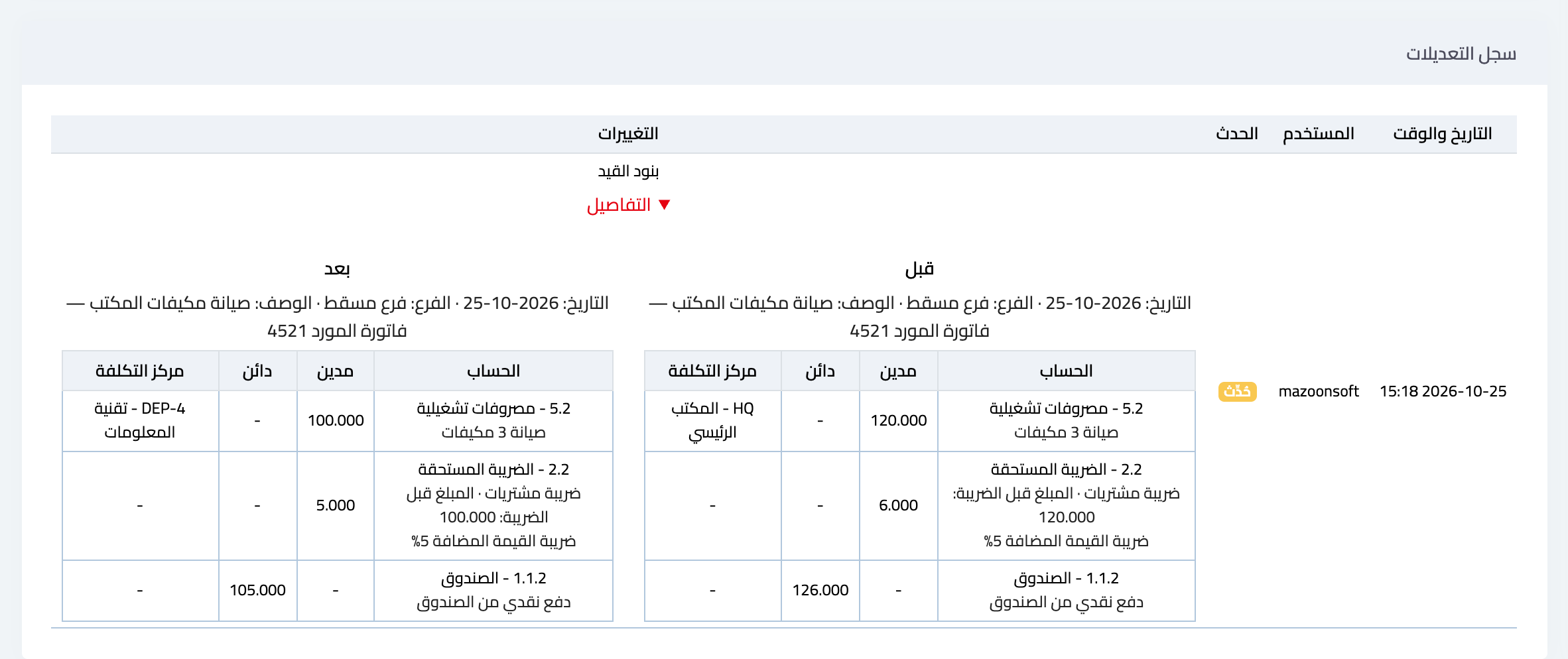
- The entry page has an Edit history section, shown in image 4: who created the entry, who edited it and when, and what changed (date, branch, description or lines). Click Details to see the entry before and after the edit side by side. Cost center changes made from the entry page are recorded there too.
- A save that changes nothing is not recorded. A deleted entry leaves its trace in the System Activity Log. What happened to an entry before this history was added on 25 October 2026, its creation or edits, does not appear in it.
- A user tied to a branch edits and deletes their own branch's manual entries only, and cannot open another branch's manual entry, even from a direct link.
When not to use a manual entry
Never correct a mistake on an invoice or voucher with an opposite manual entry. Edit or cancel the document itself and its entry follows, keeping document and entry in step. An opposite manual entry leaves you with a wrong document in your invoice lists and right numbers in the accounts — worse than the original mistake, because it hides it.
Review tips
- Review manual entries before closing each month; they are the most exposed to human error because no document backs them.
- Put a clear reason in the description, and attach the document the entry rests on under Supporting documents, so a reviewer understands the entry without asking you.
- Entries created from documents are not edited here; edit the document and the entry follows.
When cost centers are switched on, a center is chosen for each revenue or expense line in the Cost center column, and it can be changed later from the entry's page, even in a closed period.
Screenshots
Try what you just read on your own data
Open a free 7-day trial — no credit card, with your own company link in minutes.